当前位置:网站首页>SCM learning notes 1 -- data download and environment construction (based on Baiwen STM32F103 series tutorials)
SCM learning notes 1 -- data download and environment construction (based on Baiwen STM32F103 series tutorials)
2022-07-24 01:10:00 【Mountains】
The first 1 piece Data download 、 Environment building
Chapter one Baiwen video system and learning route
1.1 Course video changes
2011-2020: Baiwen recorded 10 Year of Linux video .
2021:
1、 For the first time Enter the field of SCM , Release single chip microcomputer courses !
2、 Re recording Linux Course , New chips 、 New kernel , New route ! Stand on a higher angle to achieve single chip microcomputer and Linux Of Unified : Unity in learning !
1.2 SCM learning route
For the study of SCM , Baiwen provides two routes . The first one is based on the information provided by the manufacturer HAL Library for development ; The second is to develop based on registers .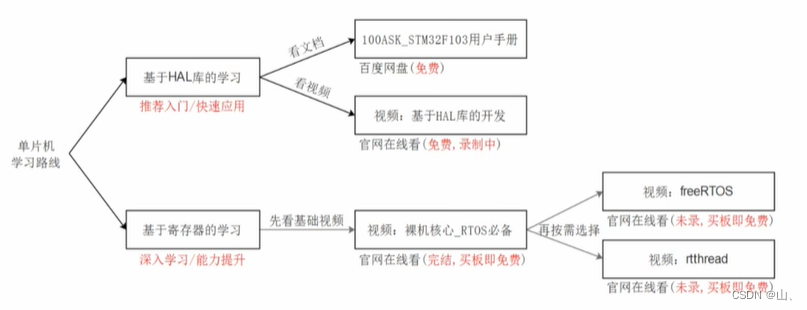
1.2.1 be based on HAL Library Development
HAL Kuo is ST At present, the main development mode of the company , The user calls the encapsulated function provided by the manufacturer , It can directly realize some functions , There is no need to have a deep understanding of the underlying principles , And all kinds of information 、 Lots of tutorials . Therefore, it can greatly save the program development cycle , At the same time, the portability of the program 、 It's also very stable , It is applicable to the rapid development of the project .
But because of HAL Ku helped you package everything , The user only needs to call , So development is easy to use , Low entry barrier , If you only do simple HAL Library Development , The upper limit is not high , The core competitiveness is not strong , It's not good for subsequent learning and improvement , So Baiwen focuses on the second learning route of single chip microcomputer —— Register based development .
1.2.2 Register based development
Develop single chip microcomputer , In essence, it is to configure various registers of the single chip microcomputer . Development through registers , You can have an in-depth understanding of some principles and details of the bottom layer of MCU , These are all RTOS At the heart of , It's also learning RTOS The necessary knowledge of . When you master this knowledge , You can learn all kinds of RTOS For example, Hongmeng 、rt-smart There are others RTOS, Even for u-boot Also need these basic knowledge . At present, for these systems , Baiwen has provided supporting development boards .

For the route 2 Related information 、 There are relatively few tutorials , After the tutorial is launched , Well received , Many old engineers with many years of work and development experience , Also studying this course .
1.3Linux Learning route
about Linux Innovation , Baiwen divides it into two steps , They are quick start series and various special series .
1.3.1 Quick start
For the quick start series , Learn first Linux Application basis , In learning driven development , Finally, start the project . After these three steps , You can make people right Linux The development of has a complete concept , Involving the bottom 、 The upper 、 And the overall project .
1.3.2 Various topics
When you get started , You can study various topics in depth , For example, in the drive topic , Baiwen will explain all kinds of drivers in depth .
1.4 How to choose a learning route
The course content of Baiwen is very rich , So how to choose a suitable learning route ? Baiwen provides three learning routes , Most of the courses are free , At present, it is by Linux The driver is charged . You can go to the official website of Baiwen (www.100ask.net) View all tutorials .

Route 1: Study HAL Library Development .
Route 2: Learn the core of MCU , After mastering the core of these microcontrollers , You can learn all kinds of things according to your interests RTOS.
Route 3: If you don't want to get started with SCM , You can learn first Linux Fundamentals of application development , Learning driven , Finally, do the project . When you get started, you can learn various topics .
1.5 Course features
1.5.1 Learn SCM
Integrate the learning of SCM with Linux Learning from Unified get up .
Linux drive = Drive frame + Hardware programming
Ugly SCM program = Rough hardware programming
Excellent MCU program = software framework + Hardware programming , There will be an easily extensible framework .
Baiwen MCU program = Imitation Linux frame + Hardware programming
So Baiwen MCU program ≈ Linux drive , stay When learning SCM, you can also learn Linux At the heart of .
With LCD For example :

stay Linux in , Divide the program into application layer and driver layer , In the driver , Two structures will be abstracted and stored separately LCD Resolution, video memory and other information .
In the single chip program , Modelled on the Linux, It also abstracts a structure similar to the above , such , When learning SCM , That's what I've learned Linux At the heart of .
So suppose you don't know SCM , When learning the single chip microcomputer course of Baiwen , Will also put Linux Some knowledge of driving has also been learned . At present, SCM courses support three development boards :STM32F103,STM32MP157,IMX6ULL.
1.5.2 Study linux
If you already know SCM , You can learn Baiwen directly Linux Drive video , There are two development boards to support :STM32MP157,IMX6ULL.
1、 Flexible choice
Linux drive = Drive frame + Hardware programming , So study Linux You can choose to learn driver framework or hardware programming ., You can according to your actual situation , Choose your learning direction flexibly .
If you are already familiar with hardware programming , You can learn QEMU video , It simplifies hardware operation , You can concentrate on learning the driving framework . If you want to get more practical experience , You can learn IMX6ULL、STM32MP157 video , Involving hardware programming .
2、 Exclusive services
Provide in class tests 、 Mock exam 、 Private class 、 Four services for homework after class . Baiwen will do some live broadcasts in the group from time to time according to everyone's needs , Help people learn .
Chapter two Data download
1、 For a single chip computer HAL Library Learning , You can choose whether to watch documents or videos .
Baiwen provides 100ASK_STM32F103 User manual for everyone to learn , There are some introductions of SCM and 26 A specific routine .
The video is still being recorded , Not all of them .
2、 For register learning , Baiwen has videos of the basic part ( The recording has been completed ), Also about FreeRTOS、RT-Thread Explanation ( It has not been recorded yet ).
2.1 Baiwen information download
For the first learning route ( be based on HAL library ) All information ( Except for the video ) All in Baidu online disk .
Download mode 1: Baidu cloud disk link :https://pan.baidu.com/s/1Fe-SrqlFo1Xl4-1BTaWlpA password :root
Download mode 2: Micro force synchronization The replication key is synchronized in Weili APP Use in :B3AIVGI73TMGVTEV27EYWKMHTLCKIRU5NXTUYR35EWYI6PVNSUU47BO
For the second learning route ( Based on register ) All information ( Except for the video ) All in Git in . About Git Use , You can find it in the data download center of the official website Git A concise tutorial .
git clone https://e.coding.net/weidongshan/noos/doc_and_source_for_mcu_mpu.git
All relevant information can be found on the official website of Baiwen (www.100ask.net) Find .
1、 Enter official website , Select the data download at the top left .

2、 Select the corresponding development board 
3、 Downloading data , It not only contains the materials of two learning routes , As well as GUI Of course materials .
HAL In the database , There is a development manual , There are both theoretical introduction and program explanation , You can learn according to the manual .
At present, Baiwen also launched GUI course , Use LVGL Wrote a set of GUI System , At present, relevant documents have been published , The video tutorial has not been released yet , You can learn by yourself according to the document .
Baiwen LVGL Series of tutorials : http://download.100ask.org/gui/lvgl/100ask_lvgl.html

2.2ST Download official information
ST The information on the official website is huge , It involves many aspects and is all in English , How to quickly and accurately find the desired chip information , It's also a problem .
For one MUC for , There will be various manuals to introduce it , Among them, data manual and reference manual are particularly important , Must download . Other things like Cortex-M3/M4 Programming manual , Flash programming manual 、 Corrigendum 、 Official firmware package sample source code 、 Official firmware package user manual 、HAL Library user manual, etc , You can download according to your specific needs .
1、 Get into ST Official website , Enter the chip you want to find in the top search box .

2、 Click the found chip to enter the detailed interface .

3、 Click on documentation, Enter the document interface , There are various documentation manuals of the chip .

4、 Select the manual you want to download .



2.3 Video material
1、 Enter official website , Find the corresponding development board classification . Development board classification –>F103-PRO–>HAL Library Development –> be based on HAL Library Development .
2、 Select the corresponding video tutorial 
2.4 Resource introduction of development version
100ASK_STM32F103 The resources of are shown in the figure below , Among them, the part marked in red is needed in the initial learning stage , Be sure to understand .
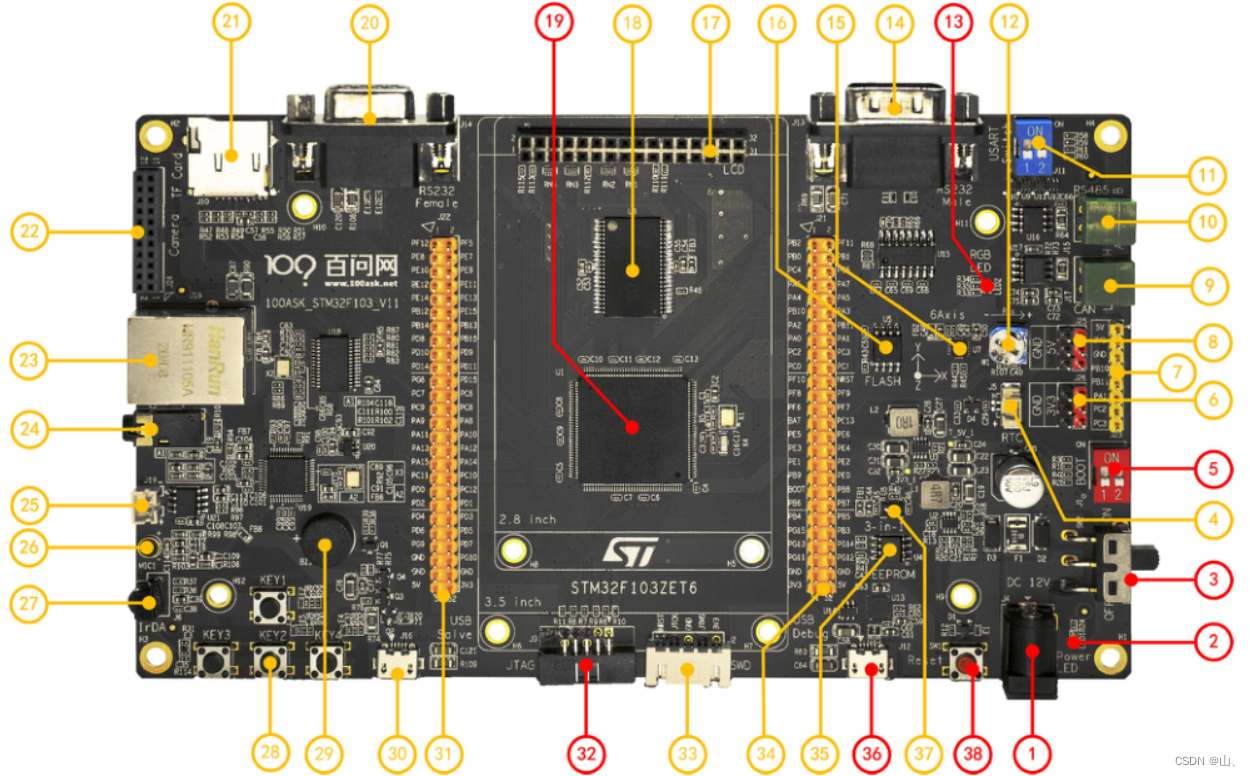

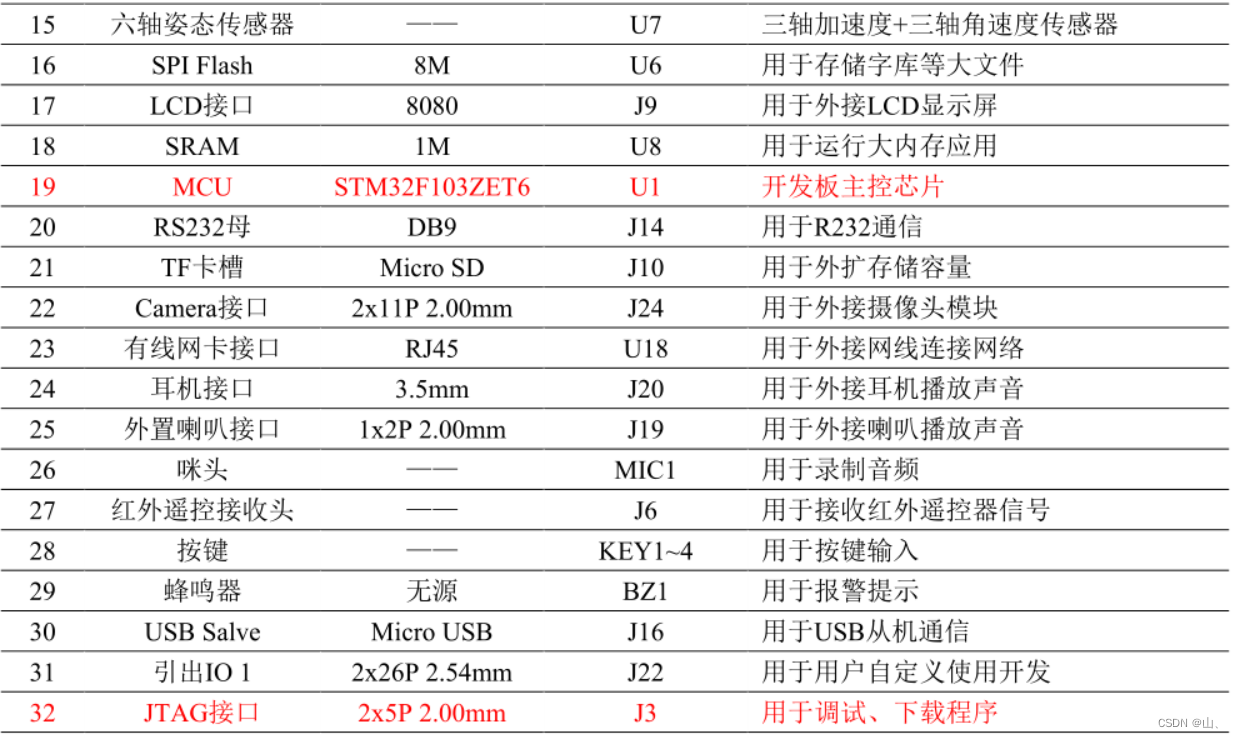

Here we will introduce the important red components .
1、DC The power interface : Access 12V The power supply .
2、 Power indicator : The power input of the development board is normal —— Light on , Input exception —— The light goes out .
3、 Power toggle switch : Move down —— Turn off the power , Fluctuate upward —— Turn on the power .
5、 Start mode selector switch : So called startup , Generally speaking, it means after a good program , When you restart the chip ,SYSCLK Of the 4 Rising edge ,BOOT The value of the pin will be locked . Users can use the Settings BOOT1 and BOOT0 Status of pins , To select the startup mode after the MCU is reset .
( One )boot0 = 0,boot1 = 0/1 when , Flash from user (flash) start-up , yes STM32 Built in Flash, Generally we use JTAG perhaps SWD When downloading program in mode , Just download it to this , After restart, start the program directly from here .
( Two )boot0 = 1,boot1 = 0 when , Boot from system memory , The program function started in this mode is set by the manufacturer .
( 3、 ... and )boot0 = 1,boot1 = 1 when , From the built-in SRAM start-up , Since it is SRAM, Naturally, there is no program storage capacity , This mode is generally used for program debugging .
13、 Tricolor LED The lamp : According to different PWM The signal shows different colors .
19、 Development board main control chip :STM32F103ZET6
32、JTAG Interface : Connect the chip to the downloader , For downloading and debugging code .
36、USB To serial port interface : Connect the computer to the development board , For debugging printing .
38、 Reset button : When pressed , Chip generates reset .
The third chapter Environment building
3.1 Embedded software development steps
Embedded development is usually divided into six steps : edit 、 Preprocessing 、 compile 、 assembly 、 link 、 Debug and download . Each link needs corresponding software implementation , If these software are integrated , It is called integrated development environment (Integrated Development Environment,IDE).
edit : In the text editor , Write code in a programming language , Save to source file , Generate .c file .
Preprocessing : By pretreatment , take .c Preprocessing instructions in the source file , Get the preprocessing file .i file .
compile : The compiler passes the preprocessed file through a series of syntax 、 Lexical analysis and optimization , Get compiled .s file .
assembly : The assembler compiles the assembly code in the assembly file into a relocatable object file used by the machine .o file . One source file corresponds to one .o file , Multiple source files correspond to multiple .o file .
link : The connector will be multiple .o Documents are linked one by one , Get an executable object file .elf file ..elf The file can be converted to a .bin file .
Debug and download : The developer downloads the executable object file to the chip , Judge whether the program meets the requirements according to the phenomenon .
The editor 、 The preprocessor 、 Assembler 、 The linker 、 The debugger is integrated , Is the integrated development environment (lntegrated Development Environment.IDE)IDE, such as Keil or STM32CubeMX Such software .
3.2STM32CubeMX Download and install
3.2.1 install Java Running environment
because STM32CubeMX Software is based on JAVA The environment is running , So you need to install JRE Can be used .
Open the package and find \3_ Development software \4_ Initialize the code generator (STM32CubeMX)\jre-8u281-windows-x64, Click Install .

3.2.2STM32CubeMX install
STM32CubeMX yes ST A code initialization generation tool launched by the company , Support ST All active chips .
The official download :https://www.st.com/zh/development-tools/stm32cubemx.html
Package installation :\3_ Development software \4_ Initialize the code generator (STM32CubeMX)\en.stm32cubemx_v6-0-1
Open the downloaded folder , double-click SetupSTM32CubeMX-6.0.1.


Be careful , If you choose the installation path, you'd better not have Chinese in the installation path , Otherwise, unexpected errors may occur .
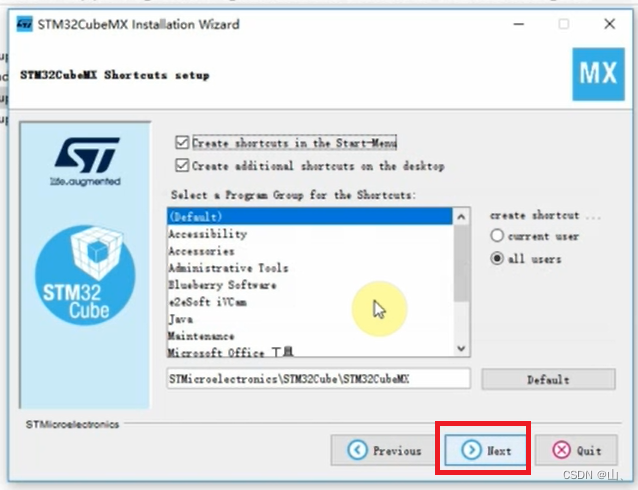


installation is complete .
3.3Keil install
Keil-MDK(Keil ARM Microcontroller Development Kit) The previous life was Germany Keil company , After being ARM Acquisition , You can see
It is ARM Official integrated development environment .
Keil Download from the official website :https://www.keil.com/download/product/
In the information package provided by Baiwen, there are also Keil Installation package . The path is a \3_ Development software \2_ Integrated development environment IDE(Keil)
On the top is Keil Chips needed SDK package . Next is Keil Installation procedure , Double-click on the run MDK532.

Select installation path , Note that if you want to customize the path , It's best not to have Chinese in the path .
Fill in some information casually .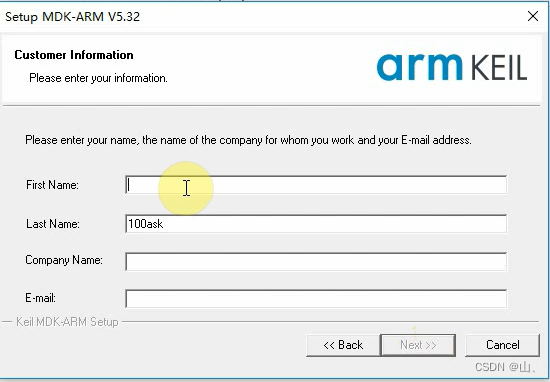
Wait for installation to complete .
installation is complete , Click on finish.
Open software , Click on ok.
install pack package , Double-click on the run Keil.STM32F1xx_DFP.2.3.0, Click on Next.
Waiting for the installation .
Click on finish, installation is complete .
边栏推荐
- Basic use of crawler requests module
- docker redis
- Jianzhi offer 05 two stacks to realize the queue
- cnpm 执行时卡住应该怎么解决?
- *offer--2
- Linx link, first level directory, redirection, CP and MV
- Implementation of singleton mode and prevention of reflection and serialization
- VIM common commands
- Tutorial on the principle and application of database system (046) -- MySQL query (VIII): group by
- About redis: there is still a risk of data loss after redis sets data persistence
猜你喜欢

Starfish OS: create a new paradigm of the meta universe with reality as the link

Focus on microservices

Dark horse programmer - interface test - four day learning interface test - day 4 - postman reads external data files, reads data files, IHRM project practice, employee management module, adds employe

OSPF experiment

Hypothesis test of Pearson correlation coefficient

docker mysql

Static extension configuration

HCIP第六天_特殊区域综合实验

Okaleido tiger NFT is about to log in to the binance NFT platform. Are you looking forward to it?

Deep understanding of collaborative process
随机推荐
Determination of host byte order
【FreeSwitch开发实践】专栏简介
Sparksql design and introduction, 220722,
Implementation of singleton mode and prevention of reflection and serialization
Tutorial on principles and applications of database system (045) -- MySQL query (VII): aggregate function
JS related knowledge
About redis: there is still a risk of data loss after redis sets data persistence
Tutorial on principles and applications of database system (051) -- MySQL query (XIII): using queries in DML statements
cnpm 执行时卡住应该怎么解决?
1000个Okaleido Tiger首发上线Binance NFT,引发抢购热潮
黑马程序员-接口测试-四天学习接口测试-第四天-Postman读取外部数据文件,读取数据文件数据,iHRM项目实战,员工管理模块,添加员工,批量运行测试用例,生成测试报告,
SQL CASE 多条件用法
[QNX hypervisor 2.2 user manual]9.1 configuration variables
爬虫请求库的使用2
[flyway introduction]
[reply] about the fact that I chose the wrong technology at the wrong time
Hypothesis test of Pearson correlation coefficient
scroll-view實現下拉刷新(避免onload進入頁面初始refresher-triggered為true觸發下拉問題)
数字化转型时代的企业数据新基建 | 爱分析报告
Prometheus+node exporter+grafana monitoring server system resources