当前位置:网站首页>13 `bs_duixiang.tag标签`得到一个tag对象
13 `bs_duixiang.tag标签`得到一个tag对象
2022-06-25 06:38:00 【安迪python学习笔记】
13 bs_duixiang.tag标签得到一个tag对象
文章目录
13.1 BeautifulSoup类提取数据的方法
选择器的作用:操作BeautifulSoup对象,查找、定位元素,并提取数据。
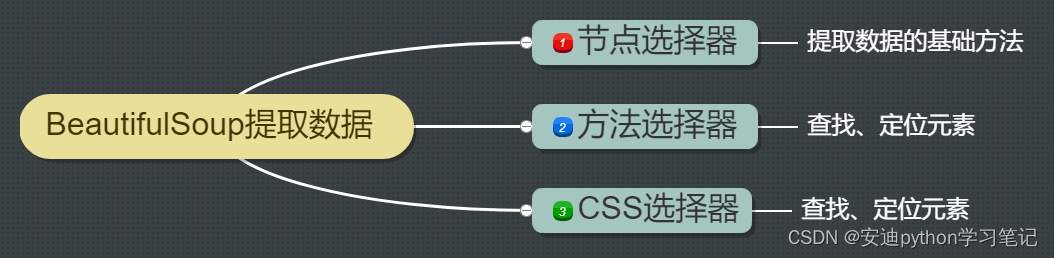
13.2 节点选择器
1. 什么是节点
<h1>一级标题</h1>
<h2>二级标题</h2>
<h3>三级标题</h3>
<p>我是一个段落</p>
上述代码是一段HTML代码。h表示标题标签。标题标签一共有6个,从h1到h6,数字越大,字号越小。p表示段落标签,用于给段落分段,在网页上独占一行。
在HTML代码中的我把hp叫做HTML标签。
在Python中,我们把hp叫做节点标签,即tag标签。
【温馨提示】这样的表述更方便初学者理解节点,和很多官方的教材有出入,仅供参考。
2. 提取节点
语法格式:bs对象.tag名称
tag指节点名称。
返回值:节点对象。
用html.parser解析器提取h2节点
html_str = """ <h2>霸王别姬</h2> <span>中国内地、中国香港</span> <span>171分钟</span> <h3>剧情简介</h3> <a href="https://maoyan.com/"></a> """
# 步骤1:从bs4 库中导入BeautifulSoup类
from bs4 import BeautifulSoup

# 步骤2:传入参数,实例化BeautifulSoup类
# 参数1是要解析的HTML字符串
# 参数2是解析器(这里用html.parser解析器)
# 实例化后得到一个BeautifulSoup对象
# bs_duixiang = <class 'bs4.BeautifulSoup'>
bs_duixiang  = BeautifulSoup(html_str, 'html.parser')
print("解析器解析后得到一个BeautifulSoup对象:")
print(type(bs_duixiang ),'\n')

# bs对象.tag名称提取节点
print("这里提取h2节点")
print(bs_duixiang.h2,'\n')

print("提取到的节点数据类型为tag对象:")
print(type(bs_duixiang .h2))
【终端输出】
解析器解析后得到一个BeautifulSoup对象:
<class 'bs4.BeautifulSoup'>

这里提取h2节点
<h2>霸王别姬</h2>

提取到的节点数据类型为tag对象:
<class 'bs4.element.Tag'>
运行代码后,成功输出了h2节点。
用lxml解析器提取span节点
html_str = """ <h2>霸王别姬</h2> <span>中国内地、中国香港</span> <span>171分钟</span> <h3>剧情简介</h3> <a href="https://maoyan.com/"></a> """
# 步骤1:从bs4 库中导入BeautifulSoup类
from bs4 import BeautifulSoup

# 步骤2:传入参数,实例化BeautifulSoup类
# 参数1是要解析的HTML字符串
# 参数2是解析器(这里用lxml解析器)
# 实例化后得到一个BeautifulSoup对象
# bs_duixiang = <class 'bs4.BeautifulSoup'>
bs_duixiang  = BeautifulSoup(html_str, 'lxml')
print("解析器解析后得到一个BeautifulSoup对象:")
print(type(bs_duixiang ),'\n')

# bs对象.tag名称提取节点
print("这里提取span节点")
print(bs_duixiang.span,'\n')

print("提取到的节点数据类型为tag对象:")
print(type(bs_duixiang .span))
【终端输出】
解析器解析后得到一个BeautifulSoup对象:
<class 'bs4.BeautifulSoup'>

这里提取span节点
<span>中国内地、中国香港</span>

提取到的节点数据类型为tag对象:
<class 'bs4.element.Tag'>
上述html_str字符中有2个标签。
代码运行成功后,我们提取到了中国内地、中国香港标签。
即2个标签中的第1个。
那是因为当html代码中存在多个相同的节点,节点选择器只会提取第1个节点。
13.3 总结

边栏推荐
- 【UVM入門 ===> Episode_9 】~ 寄存器模型、寄存器模型的集成、寄存器模型的常規方法、寄存器模型的應用場景
- Redirect to previous page after login? PHP - Redirecting to previous page after login? PHP
- The significance and proof of weak large number theorem
- The most basic difference between clustering and classification.
- アルマ / alchemy girl
- [learn FPGA programming from scratch -43]: vision chapter - technology evolution of chip design in the post Moore era -2- evolution direction
- 1W words | 40 pictures | hard core es actual combat
- Finally, when you open source the applet ~
- I have used it for six years!
- Why use NoSQL with MySQL?
猜你喜欢

【他字字不提爱,却句句都是爱】
From perceptron to transformer, a brief history of deep learning

LabVIEW jump to web page

Efficient exploration | an application practice of ES geographical location query
![Analysis on the trend of the number of national cinemas, film viewers and average ticket prices in 2021 [figure]](/img/01/594990789cbc1817dbbf61b7dd0c4c.jpg)
Analysis on the trend of the number of national cinemas, film viewers and average ticket prices in 2021 [figure]

Omni toolbox direct download

Debug through yalc before releasing NPM package

网络是怎样连接的?

Navicat prevent new query from being deleted by mistake

Atomic alpha development board -- SD card and EMMC burning tool
随机推荐
Error reported during vivado simulation common 17-39
lotus v1.16.0-rc2 Calibration-net
StreamNative Platform 1.5 版本发布,集成 Istio、支持 OpenShift 部署
Blue Bridge Cup SCM module code (nixie tube) (code + comments)
【一起上水硕系列】Day 4
Learn the first routine of FPGA
I have used it for six years!
[Yu Yue education] engineering testing technology reference of Wenhua University
Conditional grouping with $exists inside $cond
基于 KubeSphere 的分级管理实践
Orcad Schematic常用功能
The upper and lower lines of the shell are merged into one line
lotus v1.16.0-rc3 calibnet
Make enough money to go back home
Navicat prevent new query from being deleted by mistake
Want to self-study SCM, do you have any books and boards worth recommending?
威迈斯新能源冲刺科创板:年营收17亿 应收账款账面价值近4亿
Enter an integer with any number of bits, and output the sum of each bit of the number. For example: 1234 – > 10
How to recover redis data from snapshot(rdb file) copied from another machine?
1W字|40 图|硬核 ES 实战