当前位置:网站首页>树莓派通过API向企业微信推送图文
树莓派通过API向企业微信推送图文
2022-08-04 17:18:00 【ttyt1217】
参考文献:
【实现】树莓派开机自动向微信发消息报告ip地址(无第三方代理)
在 企业微信 官网 注册,不一定要是已注册的企业,个人筹备中的公司也能注册,只是会对外名字后显示 未验证 字样,个人使用的话不必在意。
注册好之后进入企业微信网页版,在“应用管理>应用>自建”一栏中点击“创建应用”,根据提示创建一个应用 H-GetMsg即可。
记住几个关键信息
以下两个在刚才创建的应用列表里找到:
1. 应用ID(AgentId)
2. 秘钥(corpSecret)
在“我的企业>企业信息”最下方找到“企业ID”
3.企业ID(corpID)在树莓派上,创建sh文件:
----发送文字
/home/pi/myboot/sendmsg2wx.sh#!/bin/bash #usage: sh sendmsg2wx.sh "msgstr" AgentId= corpSecret= corpId= temp=`curl https://qyapi.weixin.qq.com/cgi-bin/gettoken?corpid=$corpId\&corpsecret=$corpSecret` if [ -n `echo $temp|awk -F ':"' '{print $3}'` ];then access_token=`echo $temp|awk -F ':"' '{print $3}'|awk -F '","' '{print $1}'` fi msgstr=$1 PostURL="https://qyapi.weixin.qq.com/cgi-bin/message/send?access_token=$access_token" curl -H "Content-type: application/json" -X POST -d '{"touser":"@all","msgtype":"text","agentid":"'"$AgentId"'","text":{ "content":"'"$msgstr"'"},"safe":0}' $PostURL使用方式:
sh sendmsg2wx.sh "msgstr"
主要逻辑:- 调用 获取凭证API,使用 corpId 和 corpSecret 获取应用调用api的凭证 access_token。
- 调用 发送应用消息API,将msgstr放在请求结构体中 发送到 终端,msgstr包含空格等字符的话需要用双引号括起来。
(更多API可参见 企业微信API官网文档)
- 在企业微信 手机端 就能接收到H-GetMsg的消息了。
*更新:----发送图片/文件
/home/pi/myboot/sendpic2wx.sh
	#!/bin/bash
	#usage: sh sendpic2wx.sh picfile
	AgentId=
	corpSecret=
	corpId=
	temp=`curl https://qyapi.weixin.qq.com/cgi-bin/gettoken?corpid=$corpId\&corpsecret=$corpSecret`
	if [ -n `echo $temp|awk -F ':"' '{print $3}'` ];then
	    access_token=`echo $temp|awk -F ':"' '{print $3}'|awk -F '","' '{print $1}'`
	fi

	filename=$1

	PostUploadURL="https://qyapi.weixin.qq.com/cgi-bin/media/upload?access_token=$access_token&type=file"
	resupload=`curl --request POST $PostUploadURL \ --header 'Content-Type: multipart/form-data' \ --form 'name="mypictmp"' \ --form '[email protected]'$1`
	if [ -n `echo $resupload|awk -F ':"' '{print $4}'` ];then
	        media_id=`echo $resupload|awk -F ':"' '{print $4}'|awk -F '","' '{print $1}'`
	fi

	PostURL="https://qyapi.weixin.qq.com/cgi-bin/message/send?access_token=$access_token"
	curl -H "Content-type: application/json" -X POST -d '{"touser":"@all","msgtype":"image","agentid":"'"$AgentId"'","image":{
    "media_id":"'"$media_id"'"},"safe":0}' $PostURL
边栏推荐
猜你喜欢

Cesium快速上手0-Cesium安装与基本介绍

Digital-intelligent supply chain management system for chemical manufacturing industry: build a smart supply system and empower enterprises to improve production efficiency
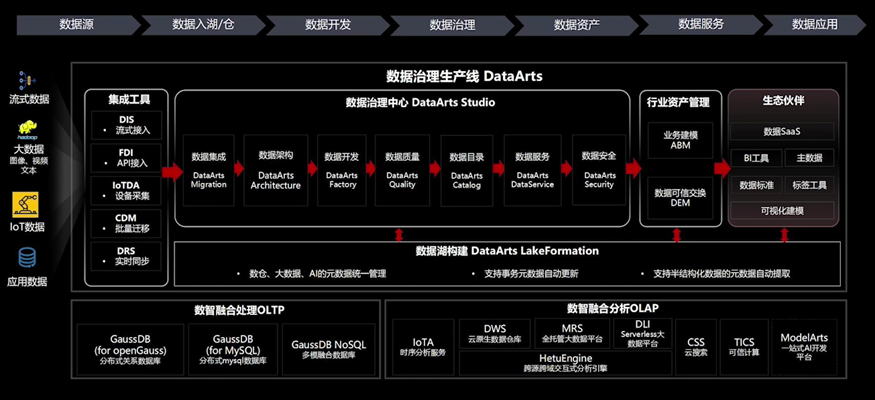
华为云数据治理生产线DataArts,让“数据‘慧’说话”

localhost,127.0.0.1,本机IP

【商家联盟】云平台—异业联盟,打造线上线下商业相结合的系统

WEB 渗透之越权

Flutter实战-请求封装(四)之gzip报文压缩

《机器学习的随机矩阵方法》

海报 | 夏季高温,危化品安全风险的注意事项必须get!

88. (the home of cesium) cesium polymerization figure
随机推荐
hi, 请问下这是什么问题, 我看官网的example就是mysql的, 咋提示不支持?
域名哪家便宜?怎么买便宜域名?
el-date-picker 设置时间范围
软件基础的理论
HCIP WPN 实验
R语言使用yardstick包的gain_curve函数评估多分类(Multiclass)模型的性能、查看模型在多分类每个分类上的增益(gain)曲线(gain curve)
基于clipboard.js对复制组件的封装
【小程序】实现发动态功能
R语言使用ggpubr包的ggsummarystats函数可视化柱状图(通过ggfunc参数设置)、在可视化图像的下方添加描述性统计结果表格、palette参数配置柱状图及统计数据的颜色
【论文阅读】Decision Transformer: Reinforcement Learning via Sequence Modeling
机器学习(十四):K均值聚类(kmeans)
安装失败怎么办
pyhon爬虫之爬取图片(亲测可用)
并发编程原理学习-reentrantlock源码分析
What does the product system of a digital financial enterprise look like?
taro 滚动组件ScrollView
Selenium Webdriver驱动自管理
并发编程原理学习-reentrantlock源码分析
【LeetCode每日一题】——374.猜数字大小
Digital-intelligent supply chain management system for chemical manufacturing industry: build a smart supply system and empower enterprises to improve production efficiency