当前位置:网站首页>PCM data format
PCM data format
2022-06-22 04:08:00 【xiaopangcame】
What is? PCM
PCM Full name Pulse-Code Modulation, Pulse modulation coding .
In fact, you don't have to care about the English interpretation , It is so named because of some historical reasons .
In audio and video ,PCM It is a method of sampling analog signals with digital representation .
To convert an audio analog signal into a digital representation , It consists of the following three steps :
1.Sampling( sampling )
2.Quantization( quantitative )
3.Coding( code )
Usually , We can use a curve to display continuous analog signals in coordinates , As shown in the figure below :

To make it easier to understand PCM, Take one of the paragraphs to illustrate .

Suppose this represents a one second audio analog signal .

Sampling( sampling )
Sampling( sampling ) Handle , In fact, the sampling data can completely represent the original signal , And the sampled data can be restored to the original signal by reconstruction , Pictured above .
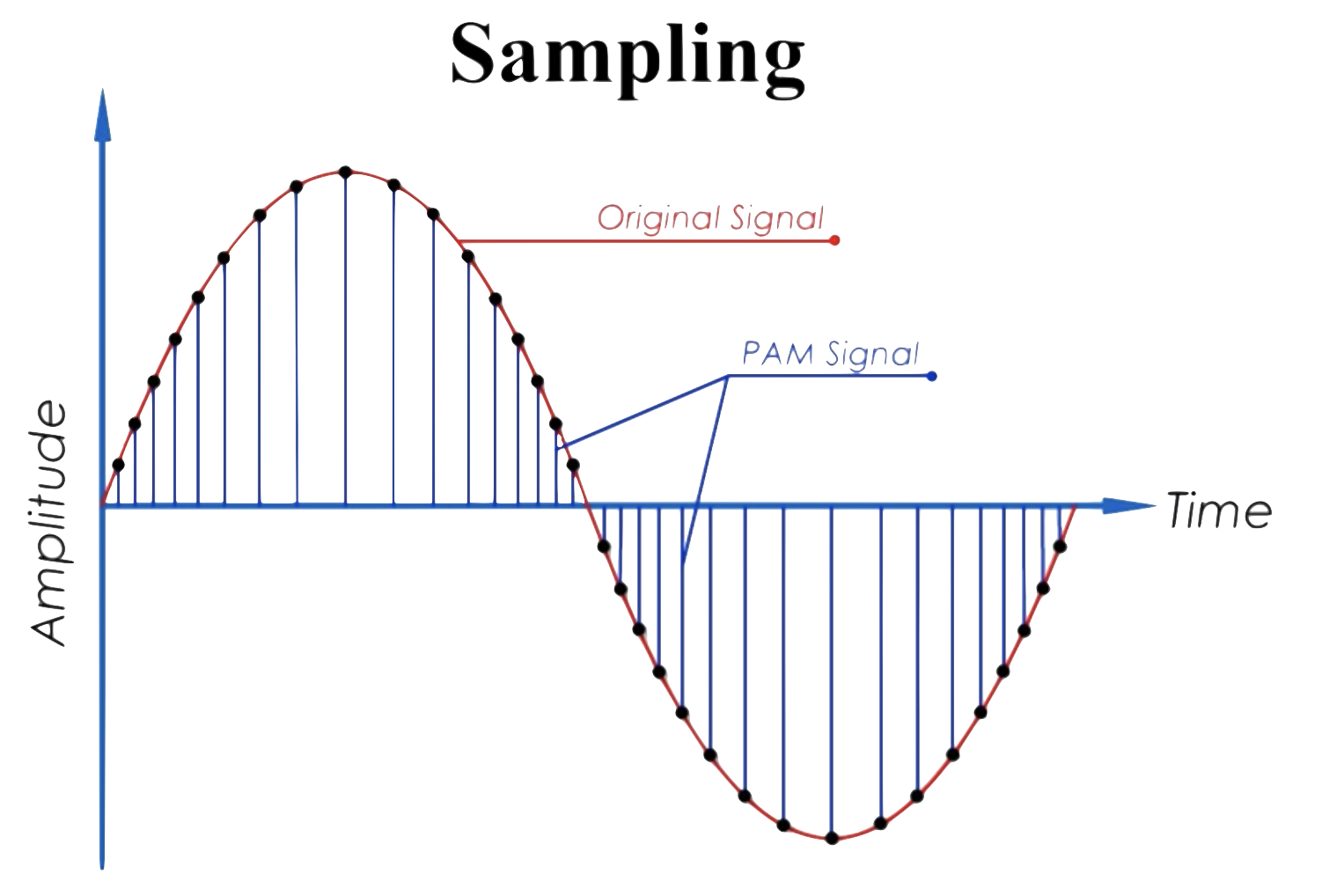
Take out the sampled graph and explain it separately :
Red curve : Represents the original signal .
Blue vertical line segment : Represents a sampling of the original signal at the current time point . Sampling is a series based on amplitude (amplitude Samples at the same time interval . This is why the sampling process is called PAM Why .
PAM:(Pulse Amplitude Modulation) Is the result of a series of discrete samples .
Sampling rate (Sample rate)
The number of samples per second is also called the sampling rate (Sample rate). stay Sampling In the illustrated case , The sampling rate is... Per second 34 Time . It means in a second , The original signal is sampled 34 Time ( That is, the number of blue vertical segments ).
Usually , The unit of sampling rate is Hz Express , for example 1Hz Indicates that the original signal is sampled once every second ,1KHz Represents sampling per second 1000 Time .1MHz Represents sampling per second 1 Millions .
Depending on the scene , The sampling rate is also different , The higher the sampling rate , The more the sound is restored , The better the quality , At the same time, the occupied space will become larger .
for example : The sampling rate during a call is 8KHz, Common media sampling rates are 44KHz, For some Blu ray films, the sampling rate is as high as 1MHz.
Quantization( quantitative )
After sampling the original signal , The size of sampling data needs to be described by quantization . Pictured :

Quantify the process , Is to send a continuous signal , Processed into time discrete signals , And use real numbers to represent . These real numbers will be converted into binary numbers for analog signal storage and transmission .
In the legend , If sampling is to draw vertical line segments , So quantification is to draw a horizontal line , A digital indicator used to measure each sample . Pictured :

In the figure , Each horizontal line represents a level (level).
In order to better describe the quantization process , Let's first introduce bit-depth( A deep ): Used to describe the method of storing digital signal values bit Count . More commonly used analog signal bit depths are :
8-bit:2^8 = 256 levels, Yes 256 Two levels can be used to measure real analog signals .
16-bit:2^16 = 65,536 levels, Yes 65,536 Two levels can be used to measure real analog signals .
24-bit:2^24 = 16,666,216 levels, Yes 16,666,216 Two levels can be used to measure real analog signals .
Obvious , The deeper the bit , The more realistic the description of the analog signal will be , The description of sound is more accurate .
In the current example , If used as 8-bit Bit depth to describe , As shown in the figure below :

The process of quantification is to round a flat top sample to the nearest available sample level Describe the process . As shown in the figure, the black bold trapezoidal broken line . In the process of quantification , We will try to make each sample and one level matching , Because of every level They all mean a bit value .
In the figure , The first 9 The flat top sample of sub sampling corresponds to level Expressed in decimal as 255, That's binary 1111 1111.
Encoding( code )

At the coding step , We'll put every on the timeline sample Convert data into corresponding binary data .
The binary data generated after the sampling data is encoded , Namely PCM data .PCM Data can be stored directly on media , It can also be stored or transmitted after encoding and decoding .
PCM Data are commonly used as quantitative indicators
Sampling rate (Sample rate): How many samples per second , With Hz In units of . See :** Sampling rate (Sample rate)** section .
Bit depth (Bit-depth): Indicates how many bits are used to describe the sampled data , It's usually 16bit. See :**Quantization( quantitative )** section .
Byte order : It means audio PCM The byte order of data storage is big end storage (big-endian) Or small end storage (little-endian), In order to improve the efficiency of data processing , Usually small end storage .
Track number (channel number): At present PCM Number of channels contained in the file , It's mono (mono)、 Two channel (stereo)? Besides, there are 5.1 Vocal tract, etc .
Whether the sampling data is signed (Sign): What I want to express is literally , It should be noted that , Sampling data with symbols cannot be played without symbols .
With FFmpeg Common in PCM data format s16le For example : It describes a sign 16 Little end PCM data .
s It means that there is a sign ,16 Indicates bit depth ,le Indicates small end storage .
PCM Data flow
about PCM The data are all pictorial descriptions , Well, for a while PCM How to represent the data stream of the format ?
With 8-bit Take the symbol as an example , Looks like this :
+---------+-----------+-----------+----
binary | 0010 0000 | 1010 0000 | ...
decimal | 32 | -96 | ...
+---------+-----------+-----------+----
Each delimiter "|" Split bytes . the reason being that 8-bit Sampling data with symbolic representation , So the sampling range is -128~128.
The figure shows the binary and decimal values of two consecutive sampled data .
If we have one PCM file , In the code , We can read such... In the following ways PCM Data flow (Stream).
FILE *file
int8_t *buffer;
file = fopen("PCM file path");
buffer = malloc(fileSize);
fread(buffer, sizeof(int8_t), fileSize / sizeof(int8_t), file);
Pseudo code simply represents a loading method . But in the code , The entire file is loaded into memory at the beginning , It's not right . Because we tend to have a large amount of audio data , Loading all at once increases the memory burden , And it's not necessary .
Usually we'll work for buffer Assign a fixed length , for example 2048 byte , Load from the file by looping PCM data , While playing .
Load well PCM After the data , It needs to be sent to the audio device driver to play , Then we should be able to hear the sound . And PCM The sampling rate usually comes with the data to the driver (sample rate), Used to tell the driver how many sampling data should be played every second . If the sampling rate passed to the driver is greater than PCM Actual sampling rate , Then the sound will play faster than the actual speed , vice versa .
OK, about PCM For the storage of data streams , It's just mono . For multichannel PCM Data for , They are usually staggered , Just like this. :
+---------+-----------+-----------+-----------+-----------+----
FL | FR | FL | FR | FL |
+---------+-----------+-----------+-----------+-----------+----
about 8-bit The signed PCM Data for , The figure above shows that the first byte stores the first left channel data (FL), The second byte puts the first right channel data (FL), The third byte puts the second left channel data (FL)…
Different drivers may arrange multichannel data slightly differently , The following is a common channel arrangement map :
2: FL FR (stereo)
3: FL FR LFE (2.1 surround)
4: FL FR BL BR (quad)
5: FL FR FC BL BR (quad + center)
6: FL FR FC LFE SL SR (5.1 surround - last two can also be BL BR)
7: FL FR FC LFE BC SL SR (6.1 surround)
8: FL FR FC LFE BL BR SL SR (7.1 surround)
Volume control
The representation of volume is actually the representation of each sampled data in the quantization process level value , As long as the sampling time is appropriately increased or reduced level You can change the volume .
But it should be noted that , And will not level value *2 You can get twice the volume of the original sound .
For two reasons :
Data overflow : We all know that the value range of each sampling data is limited , For example, one signed 8-bit sample , The value range is -128~128, The value is 125 when , When magnified twice, the value is 250, Beyond the scope of description , There is a data overflow . At this time, we need to do strategic tailoring , Make the enlarged value conform to the value range of the current format .
The following pseudocode describes signed 8-bit The sound of the format is amplified by twice the clipping processing :
int16_t pcm[1024] = read in some pcm data;
int32_t pcmval;
for (ctr = 0; ctr < 1024; ctr++) {
pcmval = pcm[ctr] * 2;
if (pcmval < 128 && pcmval > -128) {
pcm[ctr] = pcmval
} else if (pcmval > 128) {
pcm[ctr] = 128;
} else if (pcmval < -128) {
pcm[ctr] = -128;
}
}
Logarithmic description : We usually use decibels to express the sound intensity (db) As a unit , In the field of acoustics , Decibel is defined as the logarithm of the ratio of sound source power to reference sound power multiplied by 10 The numerical . According to the psychoacoustic model of the human ear , The degree of human ear perception of sound is logarithmic , Not a linear relationship . Human auditory response is based on the relative change of sound rather than absolute change . Logarithmic scale can just imitate the response of human ears to sound . Therefore, using decibel as a unit to describe sound intensity is more in line with human perception of sound intensity . Earlier, we just multiplied the sound by a certain value , That is, linear regulation , When you adjust the volume, you will feel that the volume changes quickly at the beginning , There seems to be no change in the back tone , If you use the logarithmic relationship to adjust the volume, the sound will increase evenly .
As shown in the figure below , The horizontal axis represents the volume adjustment slider , The ordinate represents the volume perceived by the human ear , Two areas with the same horizontal axis change are taken in the figure , The volume slider slides and changes the same , But the volume change felt by human ears is different , On the left, which is a quiet place , Feel the volume change greatly , The volume change felt by the human ear is small in the loud area on the right .

This requires a reasonable value for the multiplier coefficient of the volume value . How to get the value , Please refer to a very professional article :PCM Volume control
Sample rate adjustment
The sampling rate is defined as : Number of samples per second . To reduce and increase the sampling rate, you only need to copy or discard the sampling data at a fixed frequency .
Such as 10Hz Represents sampling per second 10 Time , We just need to put 2*n(n For from 0 The value of the beginning ) The sampling data at is discarded , You can get 10/2 = 5Hz Sample data of .
边栏推荐
- 详细专业的软件功能测试报告应该怎样书写
- Is it safe to open an account in Guoyuan futures?
- php判断当前时间有没有超过几点
- CentOS uses composer install to report an error - phpunitphppunit 8
- Kubernetes cluster log management
- 微信小程序 上传七牛云 laravel
- 有了这几个刷题网站,还愁跳槽不涨薪?
- [schematic diagram and PCB] design of ultrasonic rangefinder based on single chip microcomputer
- FaceShifter.ipynb
- Wireshark packet analysis Wireshark 0051 pcap
猜你喜欢

首个女性向3A手游要来了?获IGN认可,《以闪亮之名》能否突出重围

CentOS uses composer install to report an error - phpunitphppunit 8

Clue binary tree

Fluent rendering Principle & detailed explanation of three trees

插入排序

Use of shutter stream

Code of ultrasonic rangefinder based on 51 (screenshot version)

Basic concept of graph

System vulnerability exploitation and right raising

CAPL learning path - Ethernet function
随机推荐
首個女性向3A手遊要來了?獲IGN認可,《以閃亮之名》能否突出重圍
线索二叉树
Low power radar sensing module, application of smart lock radar sensing scheme, smart radar sensor technology
BFs of figure
Comment dart asynchrone est implémenté
首个女性向3A手游要来了?获IGN认可,《以闪亮之名》能否突出重围
Fluent syntax configuration
树莓派初步使用
【shell】1加到100的方法
Idea blue screen solution
Dart异步是怎麼實現
Binary tree cueing
DFS of graph
哈夫曼树
Flutter 颜色渐变及模仿淘宝渐变关注按钮
Idea installation and use tutorial
Kubernetes 集群日志管理
基于SSM的博客系统【带后台管理】
PCM数据格式
顺序表的基本操作