当前位置:网站首页>Build your own target detection environment, model configuration, data configuration mmdetection
Build your own target detection environment, model configuration, data configuration mmdetection
2022-07-23 22:46:00 【FakeOccupational】
Data tagging


MMDetection
Project Download

The environment create
#  establish conda
conda create -n open-mmlab python=3.7 -y
conda activate open-mmlab

# pytorch  install  #  You can also migrate an environment directly conda create -n New --clone Old

conda install pytorch torchvision -c pytorch # conda install pytorch cudatoolkit=10.1 torchvision -c pytorch

#  Environmental installation
pip install openmim
mim install mmdet

#  Error handling , See  https://github.com/open-mmlab/mmdetection/blob/master/docs/zh_cn/get_started.md/#Installation
A simple example

#%%

from mmdet.apis import init_detector, inference_detector, show_result_pyplot
import mmcv

#%%  Need from url Download pth file

config_file = '../configs/faster_rcnn/faster_rcnn_r50_fpn_1x_coco.py'
# download the checkpoint from model zoo and put it in `checkpoints/`
# url: https://download.openmmlab.com/mmdetection/v2.0/faster_rcnn/faster_rcnn_r50_fpn_1x_coco/faster_rcnn_r50_fpn_1x_coco_20200130-047c8118.pth
checkpoint_file = '../checkpoints/faster_rcnn_r50_fpn_1x_coco_20200130-047c8118.pth'

#%%

# build the model from a config file and a checkpoint file
model = init_detector(config_file, checkpoint_file, device='cuda:0')

#%%

# test a single image
img = 'demo.jpg'
result = inference_detector(model, img)

#%%

# show the results
show_result_pyplot(model, img, result)
Instructions for data preparation

COCO Format datasets

 {
            "id": 19, #
            "width": 1280,
            "height": 720,
            "file_name": "013351.jpg", #  File name
            "license": "",
            "flickr_url": "",
            "coco_url": "",
            "date_captured": ""
        },
The configuration file
- Super many configuration files ,config It contains all , When training, you only need to run train Sentence can be used

- open fast-rcnn A profile for

The model configuration
such as :fastrcnn Refer to the ’…/base/models/fast_rcnn_r50_fpn.py’
…/base/models/fast_rcnn_r50_fpn.py The configuration is :
# model settings
model = dict(
    type='FastRCNN',
    backbone=dict(  #  Go to model In a folder backbone Folder
        type='ResNet',# __init__ It is registered in the document type
        depth=50,#  Here are the parameters of the model
        num_stages=4,
        out_indices=(0, 1, 2, 3),
        frozen_stages=1,
        norm_cfg=dict(type='BN', requires_grad=True),
        norm_eval=True,
        style='pytorch',
        init_cfg=dict(type='Pretrained', checkpoint='torchvision://resnet50')),
    neck=dict(
        type='FPN',
        in_channels=[256, 512, 1024, 2048],
        out_channels=256,
        num_outs=5),
    roi_head=dict(
        type='StandardRoIHead',
        bbox_roi_extractor=dict(
            type='SingleRoIExtractor',
            roi_layer=dict(type='RoIAlign', output_size=7, sampling_ratio=0),
            out_channels=256,
            featmap_strides=[4, 8, 16, 32]),
        bbox_head=dict(
            type='Shared2FCBBoxHead',
            in_channels=256,
            fc_out_channels=1024,
            roi_feat_size=7,
            num_classes=80,
            bbox_coder=dict(
                type='DeltaXYWHBBoxCoder',
                target_means=[0., 0., 0., 0.],
                target_stds=[0.1, 0.1, 0.2, 0.2]),
            reg_class_agnostic=False,
            loss_cls=dict(
                type='CrossEntropyLoss', use_sigmoid=False, loss_weight=1.0),
            loss_bbox=dict(type='L1Loss', loss_weight=1.0))),
    # model training and testing settings
    train_cfg=dict(
        rcnn=dict(
            assigner=dict(
                type='MaxIoUAssigner',
                pos_iou_thr=0.5,
                neg_iou_thr=0.5,
                min_pos_iou=0.5,
                match_low_quality=False,
                ignore_iof_thr=-1),
            sampler=dict(
                type='RandomSampler',
                num=512,
                pos_fraction=0.25,
                neg_pos_ub=-1,
                add_gt_as_proposals=True),
            pos_weight=-1,
            debug=False)),
    test_cfg=dict(
        rcnn=dict(
            score_thr=0.05,
            nms=dict(type='nms', iou_threshold=0.5),
            max_per_img=100)))


Data configuration

data = dict(
    samples_per_gpu=2,#  Every gpu Upper batch_size  total batch= samples_per_gpu* numbergpu
    workers_per_gpu=2,#  One GPU Several processes load data
    train=dict(
        proposal_file=data_root + 'proposals/rpn_r50_fpn_1x_train2017.pkl',
        pipeline=train_pipeline),
    val=dict(
        proposal_file=data_root + 'proposals/rpn_r50_fpn_1x_val2017.pkl',
        pipeline=test_pipeline),
    test=dict(
        proposal_file=data_root + 'proposals/rpn_r50_fpn_1x_val2017.pkl',
        pipeline=test_pipeline))


The most basic coco To configure

# dataset settings
dataset_type = 'CocoDataset'#  Which data set type
data_root = 'data/coco/'#  Data path
img_norm_cfg = dict(
    mean=[123.675, 116.28, 103.53], std=[58.395, 57.12, 57.375], to_rgb=True)

 # train Data processing of
train_pipeline = [
    dict(type='LoadImageFromFile'),
    dict(type='LoadAnnotations', with_bbox=True),
    dict(type='Resize', img_scale=(1333, 800), keep_ratio=True),#  keep aspect ratio  1333, 800 Is the size limit , No resize Target size to
    dict(type='RandomFlip', flip_ratio=0.5),
    dict(type='Normalize', **img_norm_cfg),
    dict(type='Pad', size_divisor=32),
    dict(type='DefaultFormatBundle'),
    dict(type='Collect', keys=['img', 'gt_bboxes', 'gt_labels']),#  Data information to be collected during training
]
 # test Data processing of
test_pipeline = [
    dict(type='LoadImageFromFile'),
    dict(
        type='MultiScaleFlipAug',
        img_scale=(1333, 800),
        flip=False,
        transforms=[
            dict(type='Resize', keep_ratio=True),
            dict(type='RandomFlip'),
            dict(type='Normalize', **img_norm_cfg),
            dict(type='Pad', size_divisor=32),
            dict(type='ImageToTensor', keys=['img']),
            dict(type='Collect', keys=['img']),
        ])
]
data = dict(
    samples_per_gpu=2,
    workers_per_gpu=2,
    train=dict(
        type=dataset_type,
        ann_file=data_root + 'annotations/instances_train2017.json',
        img_prefix=data_root + 'train2017/',
        pipeline=train_pipeline),
    val=dict(
        type=dataset_type, #  It's here dataset_type
        ann_file=data_root + 'annotations/instances_val2017.json',
        img_prefix=data_root + 'val2017/',
        pipeline=test_pipeline),
    test=dict(
        type=dataset_type,
        ann_file=data_root + 'annotations/instances_val2017.json',
        img_prefix=data_root + 'val2017/',
        pipeline=test_pipeline))
evaluation = dict(interval=1, metric='bbox')#  Interval between verifications , Every training one epoch Just verify it once  ,  The evaluation standard is  bbox
Training settings
 # model training and testing settings
    train_cfg=dict(
        rcnn=dict(
            assigner=dict(
                type='MaxIoUAssigner',
                pos_iou_thr=0.5,
                neg_iou_thr=0.5,
                min_pos_iou=0.5,
                match_low_quality=False,
                ignore_iof_thr=-1),
            sampler=dict(
                type='RandomSampler',
                num=512,
                pos_fraction=0.25,
                neg_pos_ub=-1,
                add_gt_as_proposals=True),
            pos_weight=-1,
            debug=False)),
    test_cfg=dict(
        rcnn=dict(
            score_thr=0.05,
            nms=dict(type='nms', iou_threshold=0.5),
            max_per_img=100)))
Reference and more

https://www.bilibili.com/video/BV1Hp4y1y788?
MMDetection Chinese document — Detailed explanation
MMDetection Chinese document —1. Ann loading
MMDetection Chinese document —2. introduction
边栏推荐
- MySQL的JDBC编程
- As a developer, you have to know the three performance testing tools JMeter, API and jmh user guide
- Crazy God redis notes 10
- Memory search - DP
- How can I open an account to buy financial products with a 6% income?
- zk 是如何解决脑裂问题的
- 糖尿病遗传风险检测挑战赛进阶
- 『晨读』如果你处在我的位置,你会怎么做?我们怎么样做,
- 海外资深玩家的投资建议(2) 2021-05-03
- Basic syntax of MySQL DDL and DML and DQL
猜你喜欢

海外资深玩家的投资建议(2) 2021-05-03

Altium Designer - schematic diagram of Arduino uno & PCB diagram (self-made Arduino board)
STM32 MCU uses ADC function to drive finger heartbeat detection module

作为开发,你不得不知道的三个性能测试工具|Jmeter、Apipost、JMH使用指南

Rails with OSS best practices

torchvision.datasets.ImageFolder前的数据整理及使用方法

D2admin framework is basically used
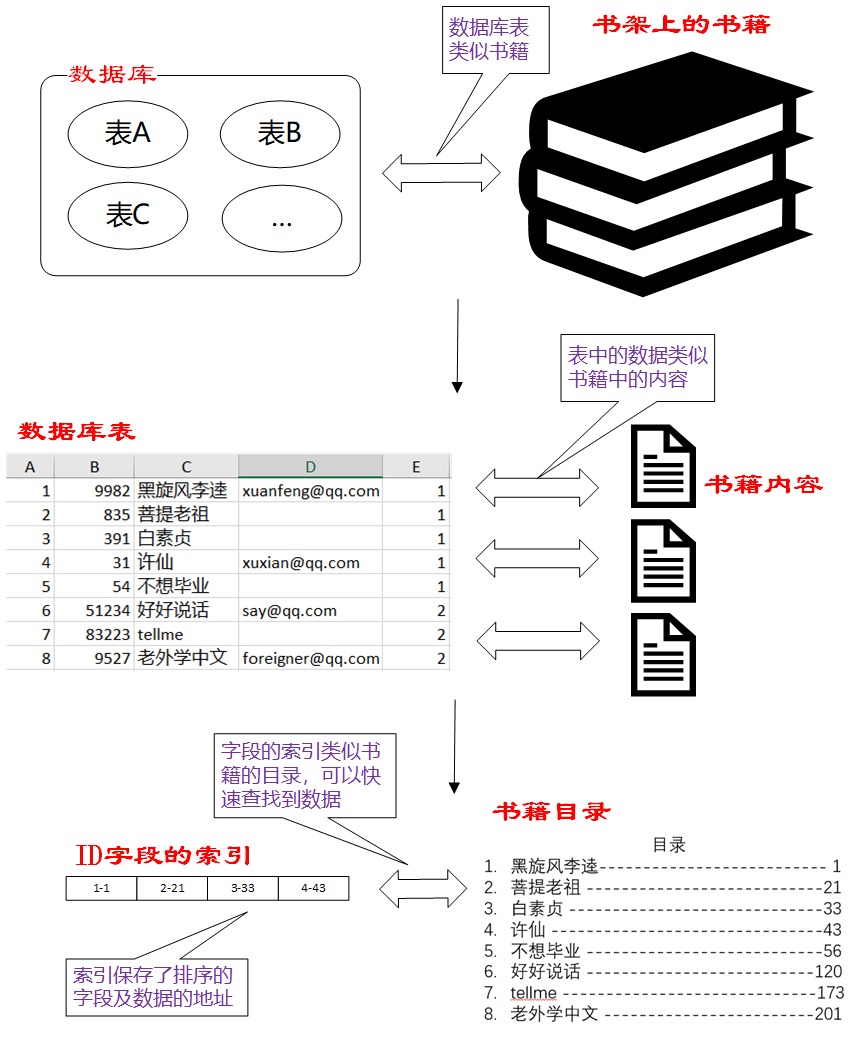
MySQL index transaction

The simple use of ADB command combined with monkey is super detailed

Ways to improve the utilization of openeuler resources 01: Introduction
随机推荐
Interface test
使用itextpdf提取PDF文件中的任意页码
Jmeter性能综合实战——签到及批量签到
Video Number strengthens the fight against vulgar content: the content that violates public order and good customs must be eliminated
除了钱,创业者还需要什么?专访明月湖创赛创投机构
JDBC programming of MySQL
详解NAT技术
fl studio 20.9更新中文版宿主DAW数字音频工作站
Multithreading problem: why should we not use multithreading to read and write the same socket connection?
ONEFLOW V0.8.0 officially released
【Unity3D日常BUG】Unity3D解决“找不到类型或命名空间名称“XXX”(您是否缺少using指令或程序集引用?)”等问题
MySQL索引事务
unity visual studio2019升级到2022版本(扔掉盗版红渣)
糖尿病遗传风险检测挑战赛进阶
Zhongbang technology devotes itself to another work -- gyro maker OA system
Storage structure and management disk. It's a bit like installing Win98. You need to partition and format the hard disk first
Explain NAT technology in detail
Array -- 27. remove elements
Neo4j application
ES6 use of arrow function