当前位置:网站首页>Enable the free pan domain SSL certificate for kubesphere cluster and realize the automatic update and distribution of certificates
Enable the free pan domain SSL certificate for kubesphere cluster and realize the automatic update and distribution of certificates
2022-07-25 06:57:00 【KubeSphere】
author :scwang18, Mainly responsible for technical architecture , There is a lot of research in container cloud .
Preface
KubeSphere The certificate installed by the cluster by default is a self issued certificate , Browser access will send security reminders . This paper records the use of let's encrytp Pan domain name certificate implementation Kubernetes Cluster external services automatically configure certificates and automatically update certificates when they expire , Support HTTPS visit . We also deployed the certificate automatic distribution component , Realize the automatic distribution of certificate files to other namespace .
framework
stay KubeSphere Use in cluster HTTPS agreement , Need a certificate manager 、 An automatic certificate issuing service
cert-manager Is a cloud native certificate management open source project , Used in KubeSphere Provided in the cluster HTTPS Certificate and automatic renewal , Support Let’s Encrypt, HashiCorp Vault The issue of these free certificates . stay KubeSphere In the cluster , We can go through Kubernetes Ingress and Let’s Encrypt Automation of external services HTTPS.
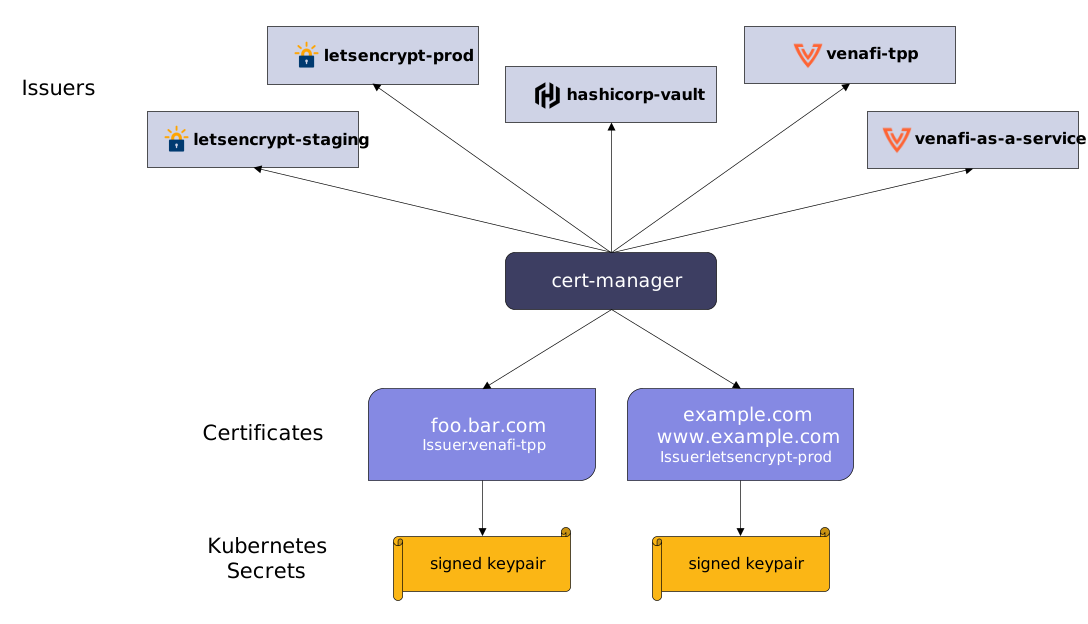
Issuers/ClusterIssuers: Define what certification authority to use (CA) Come and issue certificates ,Issuers and ClusterIssuers The difference is that : issuers Is a namespace level resource , It can only be used to sign where you are namespace Certificate under ,ClusterIssuer It is a cluster level resource You can issue any namespace Certificate under
Certificate: Define the required X.509 certificate , The certificate will be updated and kept up to date .Certificate Is a namespace resource , When Certificate Is created , It will create corresponding CertificateRequest Resources come and go to apply for certificates .
Install certificate manager
Installing the certificate manager is relatively simple , Just execute the following script directly .
$ kubectl create ns cert-manager$ helm uninstall cert-manager -n cert-manager$ helm install cert-manager jetstack/cert-manager \ -n cert-manager \ --version v1.8.0 \ --set installCRDs=true \ --set prometheus.enabled=false \ --set 'extraArgs={--dns01-recursive-nameservers-only,--dns01-recursive-nameservers=119.29.29.29:53\,8.8.8.8:53}' Select certificate issuer
cert-manager The following certificate issuers are supported :
- SelfSigned
- CA
- Vault
- Venafi
- External
- ACME
We choose to use ACME To issue certificates .
Select certificate verification method
Common verification methods include HTTP-01 、DNS-01 .
DNS-01 Calibration principle
DNS-01 The verification principle of is to use DNS The provider's API Key Get DNS Control authority , stay Let’s Encrypt by ACME After the client provides the token ,ACME client (cert-manager) A... Derived from this token and my account key will be created TXT Record , And put the record in _acme-challenge. then Let’s Encrypt To DNS The system queries this record , If I find a match , You can issue certificates . This method supports pan domain name certificates .
HTTP-01 Calibration principle
HTTP-01 The verification principle of is to point to the domain name HTTP Add a temporary location ,Let’s Encrypt Will send HTTP Ask to http:///.well-known/acme-challenge/, Parameters in YOUR_DOMAIN Is the verified domain name ,TOKEN yes ACME The client of the protocol is responsible for placing the file ,ACME The client is cert-manager, It can be modified or created Ingress Rule to add this temporary verification path and point to provide TOKEN Service for .Let’s Encrypt Will compare TOKEN Is it in line with expectations , The certificate will be issued after the verification is successful . This method is only applicable to the use of Ingress Services that expose traffic issue certificates , Pan domain name certificate is not supported .
Comparison of advantages and disadvantages
HTTP-01 The advantage of the verification method is : The configuration is simple and universal , Whatever you use DNS Providers can use the same configuration method ; The disadvantage is that : Need to rely on Ingress, If the service does not pass Ingress Exposed ones don't apply , And does not support pan domain name certificates .
DNS-01 The advantage of the verification method is that there is no HTTP-01 Shortcomings of the verification method , Do not rely on Ingress, Pan domain name is also supported ; The disadvantage is different DNS Providers are configured differently , And only cert-manager Supported by DNS Providers can choose this method .
Cert-manager Support for external use webhook Access to DNS provider , It happens that the company uses Tencent cloud DNSPOD Belong to the ranks of support . We can choose DNS-01 .
HTTP-01 Configuration example
This configuration example is for reference only , In this way , How many Ingress service , Just how many certificates you need to apply for , More trouble , But the configuration is relatively simple , Do not rely on DNS Service provider .
1. establish CA Cluster certificate issuer
Certificate manager requires Issuer or ClusterIssuer resources , To issue certificates . These two kinds of Kubernetes The functions of resources are exactly the same , The difference lies in Issuer For a single namespace , and ClusterIssuer Applicable to all namespaces .
# ClusterIssuer.yamlapiVersion: cert-manager.io/v1kind: ClusterIssuermetadata: name: letsencryptspec: acme: email: [email protected] server: https://acme-v02.api.letsencrypt.org/directory privateKeySecretRef: name: issuer-account-key solvers: - http01: ingress: class: nginxexplain :
- metadata.name: It's the name of the issuing authority we created , We will refer to it later when we create the certificate ;
- spec.acme.email: It's your own mailbox , There will be an email reminder when the certificate is about to expire , however cert-manager Make use of acme The agreement automatically reissues us with a new certificate to renew ;
- spec.acme.server: yes acme The server side of the protocol , We use Let’s Encrypt;
- spec.acme.privateKeySecretRef: Indicates to which... The private key of this issuing authority will be stored Secret In the object ;
- spec.acme.solvers: Here, it indicates the verification method of the issuing authority , Yes http01 and dns01 Two kinds of , Configured under this field class and name Only one... Can exist at the same time , class Designated to use Ingress class name , name Less use , Usually used for Kubernetes Of Ingress.
$ kubectl apply -f ClusterIssuer.yaml -n cert-managerAfter successful execution , The certificate file of the application will be placed in issuer-account-key This Secret in .
Check whether the certificate is automatically created successfully :
$ kubectl -n infra get certificate2. stay Ingress Use the SSL certificate
# ingreess-wikijs.yamlapiVersion: networking.k8s.io/v1kind: Ingressmetadata: annotations: cert-manager.io/cluster-issuer: letsencrypt nginx.ingress.kubernetes.io/proxy-body-size: "0" name: ingress-wikijsspec: ingressClassName: nginx rules: - host: wiki.xxx.xxx http: paths: - backend: service: name: wikijs port: number: 3000 path: / pathType: Prefix tls: - hosts: - wikijs.xxx.xxx secretName: ingress-wikijs-tlsBe careful : stay annotations in Set up
cert-manager.io/cluster-issuerCluster certificate issuer created for signatureletsencrypt.
Use yaml File creation ingress after , You can use the Ingress External provision HTTPS Yes .
# Execution creation ingresskubectl apply -f ingress-wikijs.yaml -n infraDNS01 Configuration example
Using this method requires DNS The service provider supports the adoption of API establish DNS Record , Just my DNS The service provider is Tencent cloud dnspod Support , So in our group , Finally, this method was adopted .
Configuration in this way will be troublesome , It's been a long time , Mainly because my cluster has enabled local DNS The server , Default cert-manager Through local DNS The server passes the verification API Created DNS txt Record , You will not be able to check the new txt Record , Cause in challenge The stage has been pendding. The solution is attached .
1. stay dnspod establish API ID and API Token
Refer to Tencent cloud official documents (https://support.dnspod.cn/Kb/showarticle/tsid/227/) Record the created API ID and API Token ( Overweight processing , You need to get your own API ID and API Token).
AKIDVt3z4uVss11xjIdmddgMmHXXssssHp9D2buxrWR8SekbG2gqdflQs5xxxviGagX8TYO2. install cert-manager-webhook-dnspod
Use helm install roc/cert-manager-webhook-dnspod.
$ helm repo add roc https://charts.imroc.cc$ helm uninstall cert-manager-webhook-dnspod -n cert-manager$ helm install cert-manager-webhook-dnspod roc/cert-manager-webhook-dnspod \ -n cert-manager \ --set clusterIssuer.secretId=AKIDVt3z4uVss11xjIdmddgMmHXXssssHp9D2buxrWR8 \ --set clusterIssuer.secretKey=SekbG2gqdflQs5xxxviGagX8TYO \ --set [email protected]3. Create a pan domain name certificate
# ipincloud-crt.yamlapiVersion: cert-manager.io/v1kind: Certificatemetadata: name: ipincloud-crtspec: secretName: ipincloud-crt issuerRef: name: dnspod kind: ClusterIssuer group: cert-manager.io dnsNames: - "*.xxx.xxx"Create a cluster certificate issuer :
$ kubectl apply -f ipincloud-crt.yaml -n infra4. Certificate of verification
Check whether the certificate was created successfully :
$ kubectl get Certificate -n cert-managerNAME READY SECRET AGEcert-manager-webhook-dnspod-ca True cert-manager-webhook-dnspod-ca 18mcert-manager-webhook-dnspod-webhook-tls True cert-manager-webhook-dnspod-webhook-tls 18mipincloud-crt True ipincloud-crt 3m12sAs can be seen above ipincloud-crt Created successfully , READY So is the state True.
Check the domain name corresponding to the certificate :
$ kubectl describe Certificate ipincloud-crt -n cert-managerName: ipincloud-crtNamespace: cert-managerLabels: <none>Annotations: <none>API Version: cert-manager.io/v1Kind: CertificateMetadata: Creation Timestamp: 2022-05-07T14:19:07Z ...Spec: Dns Names: *.xxx.xxx Issuer Ref: Group: cert-manager.io Kind: ClusterIssuer Name: dnspod Secret Name: ipincloud-crtStatus: Conditions: Last Transition Time: 2022-05-07T14:19:14Z Message: Certificate is up to date and has not expired Observed Generation: 1 Reason: Ready Status: True Type: Ready Not After: 2022-08-05T13:19:11Z Not Before: 2022-05-07T13:19:12Z Renewal Time: 2022-07-06T13:19:11Z Revision: 1Events: Type Reason Age From Message ---- ------ ---- ---- ------- Normal Issuing 4m35s cert-manager-certificates-trigger Issuing certificate as Secret does not exist Normal Generated 4m35s cert-manager-certificates-key-manager Stored new private key in temporary Secret resource "ipincloud-crt-4ml59" Normal Requested 4m35s cert-manager-certificates-request-manager Created new CertificateRequest resource "ipincloud-crt-r76wp" Normal Issuing 4m28s cert-manager-certificates-issuing The certificate has been successfully issued from Certificate You can see the description information of , This certificate corresponds to all *.xxx.xxx Pan domain name .
View the contents of the certificate :
$ kubectl describe secret ipincloud-crt -n cert-managerName: ipincloud-crtNamespace: cert-managerLabels: <none>Annotations: cert-manager.io/alt-names: *.xxx.xxx cert-manager.io/certificate-name: ipincloud-crt cert-manager.io/common-name: *.xxx.xxx cert-manager.io/ip-sans: cert-manager.io/issuer-group: cert-manager.io cert-manager.io/issuer-kind: ClusterIssuer cert-manager.io/issuer-name: dnspod cert-manager.io/uri-sans: Type: kubernetes.io/tlsData====tls.crt: 5587 bytestls.key: 1675 bytesTLS The certificate is kept in cert-manager In namespace ipincloud-crt secret. For all ``*.xxx.xxx` Service use of .
other
In the process , The biggest pit encountered is : My cluster uses self built DNS The server , Default cert-manager Will use the self built of this cluster DNS SERVER Verify the certificate issuance , Although by calling dnspod Of webook stay Tencent cloud DNS Created on the server _acme-challenge Data handshake , But in my self built DNS You can't find it in , So it will always be stuck pending state .
$ kubectl get challenge -ANAMESPACE NAME STATE DOMAIN AGEcert-manager ipincloud-crt-f9kp6-381578565-136350475 pending xxx.xxx 24sThe reason for this is :
Waiting for DNS-01 challenge propagation: DNS record for "xxx.xxx" not yet
$ kubectl -n cert-manager describe challenge ipincloud-crt-f9kp6-381578565-136350475Name: ipincloud-crt-f9kp6-381578565-136350475Namespace: cert-managerLabels: <none>Annotations: <none>API Version: acme.cert-manager.io/v1Kind: Challenge--- Intermediate slightly ---Status: Presented: true Processing: true Reason: Waiting for DNS-01 challenge propagation: DNS record for "xxx.xxx" not yet propagated State: pendingEvents: Type Reason Age From Message ---- ------ ---- ---- ------- Normal Started 41s cert-manager-challenges Challenge scheduled for processing Normal Presented 39s cert-manager-challenges Presented challenge using DNS-01 challenge mechanismA lot of information , Find the solution on the official website . The way is to let cert-manager Force the specified DNS The server performs handshake verification .
I'm using helm install cert-manager, So add set Parameters .
--set 'extraArgs={--dns01-recursive-nameservers-only,--dns01-recursive-nameservers=119.29.29.29:53\,8.8.8.8:53}' Reference documents :https://cert-manager.io/docs/configuration/acme/dns01/#setting-nameservers-for-dns01-self-check
Configure certificate replication to other namespace
install kubed
$ helm repo add appscode https://charts.appscode.com/stable/$ helm repo update$ helm install kubed appscode/kubed \ --version v0.13.2 \ --namespace cert-managermodify Certificated file
by certificated Object settings secretTemplate, Set the synchronization to namespace.
# ipincloud-crt.yamlapiVersion: cert-manager.io/v1kind: Certificatemetadata: name: ipincloud-crtspec: secretName: ipincloud-crt issuerRef: name: dnspod kind: ClusterIssuer group: cert-manager.io dnsNames: - "*.xxx.xxx" secretTemplate: annotations: kubed.appscode.com/sync: "cert-manager-tls=ipincloud-crt" Give the target that needs synchronization namespace hit label
Last step secretTemplate The synchronization target is specified in namespace Of label Filter conditions cert-manager-tls=ipincloud-crt , therefore , We need to synchronize the reception secret Of namespace Type the corresponding label.
$ kubectl label ns default cert-manager-tls=ipincloud-crt$ kubectl label ns app cert-manager-tls=ipincloud-crt$ kubectl label ns dev-app cert-manager-tls=ipincloud-crt$ kubectl label ns dev-infra cert-manager-tls=ipincloud-crt$ kubectl label ns dev-wly cert-manager-tls=ipincloud-crt$ kubectl label ns infra cert-manager-tls=ipincloud-crt$ kubectl label ns istio-system cert-manager-tls=ipincloud-crt$ kubectl label ns uat-app cert-manager-tls=ipincloud-crt$ kubectl label ns uat-wly cert-manager-tls=ipincloud-crt$ kubectl label ns wly cert-manager-tls=ipincloud-crt$ kubectl label ns kubesphere-controls-system cert-manager-tls=ipincloud-crtSee if the copy is successful
Look at the goal namespace Copy or not secret success .
$ kubectl get secret ipincloud-crtNAME TYPE DATA AGEipincloud-crt kubernetes.io/tls 2 18mView copied secret , You can see label The certificate source information is recorded in the information .
$ kubectl describe secret ipincloud-crtName: ipincloud-crtNamespace: defaultLabels: kubed.appscode.com/origin.cluster=unicorn kubed.appscode.com/origin.name=ipincloud-crt kubed.appscode.com/origin.namespace=cert-managerAnnotations: cert-manager.io/alt-names: *.xxx.xxx cert-manager.io/certificate-name: ipincloud-crt cert-manager.io/common-name: *.xxx.xxx cert-manager.io/ip-sans: cert-manager.io/issuer-group: cert-manager.io cert-manager.io/issuer-kind: ClusterIssuer cert-manager.io/issuer-name: dnspod cert-manager.io/uri-sans: kubed.appscode.com/origin: {"namespace":"cert-manager","name":"ipincloud-crt","uid":"b4713633-731e-4151-844f-0f6d9cf6352c","resourceVersion":"12531075"}Type: kubernetes.io/tlsData====tls.crt: 5587 bytestls.key: 1675 bytesUse TLS Certificate configuration Ingress
Set up Ingress
kind: IngressapiVersion: networking.k8s.io/v1metadata: name: wikijs namespace: infra annotations: nginx.ingress.kubernetes.io/proxy-body-size: '0'spec: ingressClassName: nginx tls: - hosts: - wiki.xxx.xxx secretName: ipincloud-crt rules: - host: wiki.xxx.xxx http: paths: - path: / pathType: ImplementationSpecific backend: service: name: wikijs port: number: 3000test
After the above configuration is completed , You can use HTTPS To visit the new wiki.js Yes .
$ curl -I https://wiki.xxx.xxxHTTP/1.1 302 FoundDate: Sat, 07 May 2022 14:52:39 GMTContent-Type: text/plain; charset=utf-8Content-Length: 28Connection: keep-aliveX-Frame-Options: denyX-XSS-Protection: 1; mode=blockX-Content-Type-Options: nosniffX-UA-Compatible: IE=edgeReferrer-Policy: same-originContent-Language: zhSet-Cookie: loginRedirect=%2F; Max-Age=900; Path=/; Expires=Sat, 07 May 2022 15:07:39 GMTLocation: /loginVary: Accept, Accept-EncodingStrict-Transport-Security: max-age=15724800; includeSubDomainsAs shown above , It started successfully HTTPS .
Reference resources
- https://artifacthub.io/packages/helm/cert-manager/cert-manager
- https://www.1nth.com/post/k8s-cert-manager/
- https://cert-manager.io/docs/configuration/acme/dns01/#setting-nameservers-for-dns01-self-check
This article by the blog one article many sends the platform OpenWrite Release !
边栏推荐
- File operation-
- 2022 Shenzhen cup
- Introduction to bridging mode and sharing mode
- 机器人工程-教学品质-如何判定
- Install, configure, and use the metroframework in the C WinForms application
- QT actual combat case (53) -- using qdrag to realize the drag puzzle function
- Traffic is not the most important thing for the metauniverse. Whether it can really change the traditional way of life and production is the most important
- labelme标注不同物体显示不同颜色以及批量转换
- 长安链Solidity智能合约调用原理分析
- Play with the one-stop plan of cann target detection and recognition [basic]
猜你喜欢

Thread 类的基本用法

QT actual combat case (53) -- using qdrag to realize the drag puzzle function
C#控件开源库:MetroFramework的下载
![[sword finger offer] analog implementation ATOI](/img/01/76a3b1fcc6403368a363146d553777.png)
[sword finger offer] analog implementation ATOI

Cointelegraph撰文:依托最大的DAO USDD成为最可靠的稳定币
C control open source library: download of metroframework

10 minutes to understand how JMeter plays with redis database

【C】 Program environment and pretreatment

Create a new STM32 project and configure it - based on registers

【terminal】x86 Native Tools Command Prompt for VS 2017
随机推荐
[C language] program environment and preprocessing
When the graduation season comes, are you ready? What are we going to do
Mysql database
解密NumPy求解梯度的一个关键难点
C#控件开源库:MetroFramework的下载
Software engineering in Code: regular expression ten step clearance
"Wei Lai Cup" 2022 Niuke summer multi school training camp 1 supplementary problem solution (incomplete)
长安链双花交易防范策略
[Yugong series] July 2022 go teaching course 016 logical operators and other operators of operators
杜教筛
探讨影响自动化测试成败的重要因素
Kyligence Li Dong: from the data lake to the index middle stage, improve the ROI of data analysis
C#开源控件MetroFramework Demo项目下载和运行
Basic usage of thread class
Leetcode46 Full Permutation (Introduction to backtracking)
Purpose of SQL square brackets
Teach you to use cann to convert photos into cartoon style
C#读取倍福Beckhoff变量
【每日一题】1184. 公交站间的距离
Argocd user management, RBAC control, script login, APP synchronization