当前位置:网站首页>用 AnimatedBuilder 分离组件和动画,实现动效复用
用 AnimatedBuilder 分离组件和动画,实现动效复用
2022-07-13 19:08:00 【InfoQ】
前言
AnimationAnimationWidgetAnimatedBuilderAnimatedBuilder 介绍
AnimatedBuilder- An
AnimatedBuilderunderstands how to render the transition. —— AnimatedBuilder 知道如何渲染转场动效。
- An
AnimatedBuilderdoesn’t know how to render the widget, nor does it manage theAnimationobject. ——AnimatedBuilder不知道(或者准确说不应)如何渲染组件,也不管理组件对象。
- Use
AnimatedBuilderto describe an animation as part of a build method for another widget. If you simply want to define a widget with a reusable animation, use anAnimatedWidget. —— 使用AnimatedBuilder作为其他组件的动效描述。如果只是想复用一个带有动效的组件,那么应该使用AnimatedWidget。这个可以看我们之前关于 AnimatedWidget 的介绍:Flutter 构建三维空间动画效果
- Examples of AnimatedBuilders in the Flutter API:
BottomSheet,ExpansionTile,PopupMenu,ProgressIndicator,RefreshIndicator,Scaffold,SnackBar,TabBar,TextField. —— 在 Flutter 中,有很多组件使用 AnimatedBuilder 构建动效。
AnimatedBuilderAnimatedBuilderAnimatedBuilderconst AnimatedBuilder({
Key? key,
required Listenable animation,
required this.builder,
this.child,
}) : assert(animation != null),
assert(builder != null),
super(key: key, listenable: animation);
builderbuilderbuilderbuilderchildAnimatedBuilderchildWidget Function(BuildContext context, Widget? child)
Transform 组件介绍
const Transform({
 Key? key,
 required this.transform,
 this.origin,
 this.alignment,
 this.transformHitTests = true,
 Widget? child,
 }) : assert(transform != null),
 super(key: key, child: child);
-
transform是一个Matrix4对象,用于定义三维空间的变换操作。
origin是一个坐标偏移量,实际会加入到Matrix4的translation(平移)中。
alignment:即转变进行的参考方位。
child:被转换的子组件。
TransformAnimatedBuilderAnimatedBuilderTransform应用
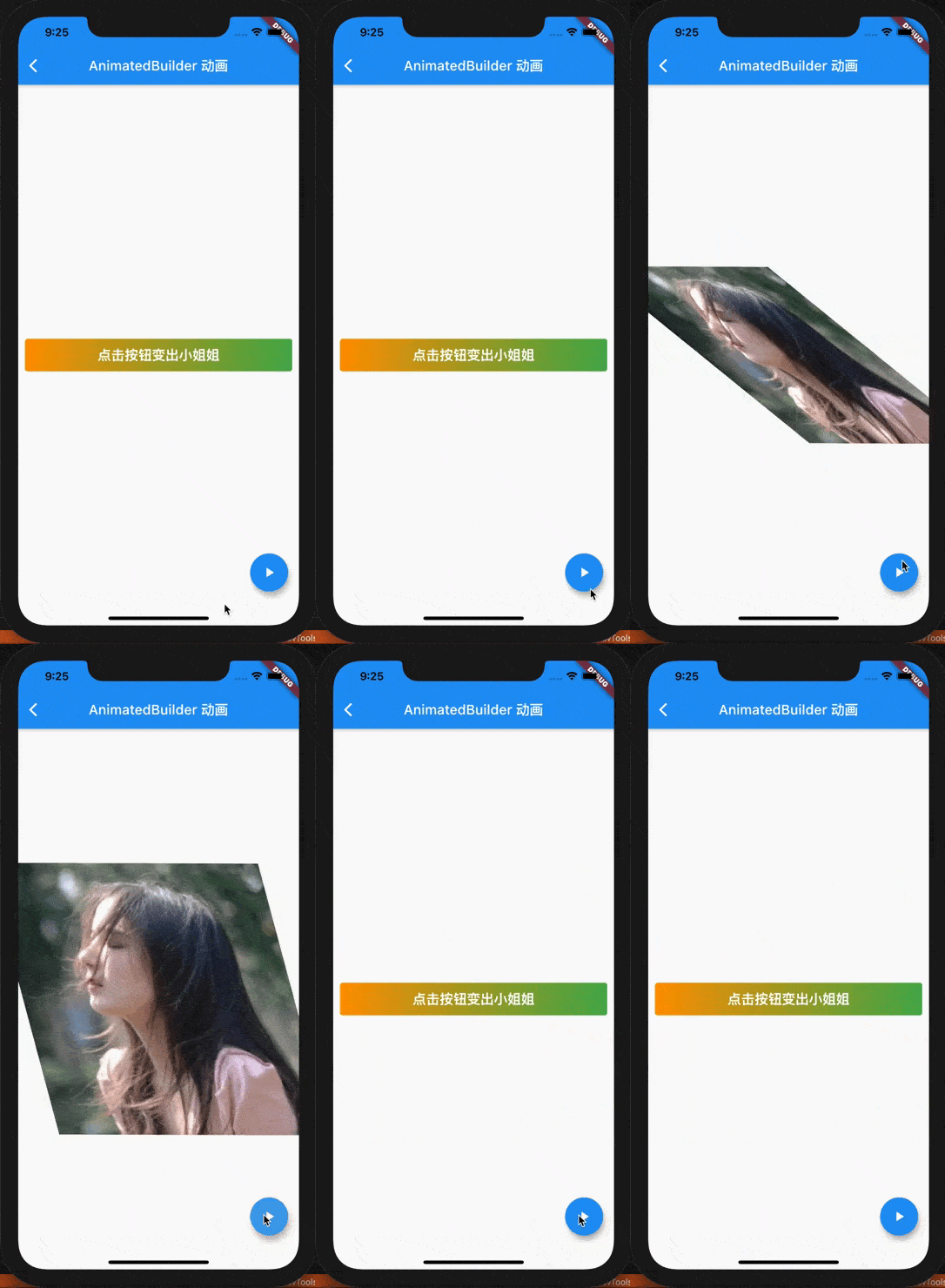
AnimatedBuilderAnimatedBuilderclass RotationSwitchAnimatedBuilder extends StatelessWidget {
final Widget child1, child2;
final Animation<double> animation;
const RotationSwitchAnimatedBuilder(
{Key? key,
required this.animation,
required this.child1,
required this.child2})
: super(key: key);
@override
Widget build(BuildContext context) {
return AnimatedBuilder(
animation: animation,
builder: (context, child) {
if (animation.value < 0.5) {
return Transform(
transform: Matrix4.identity()
..rotateZ(animation.value * pi)
..setEntry(0, 1, -0.003),
alignment: Alignment.center,
child: child1,
);
} else {
return Transform(
transform: Matrix4.identity()
..rotateZ(pi)
..rotateZ(animation.value * pi)
..setEntry(1, 0, 0.003),
child: child2,
alignment: Alignment.center,
);
}
},
);
}
}
child1child2WidgetBuilderRotationSwitchAnimatedBuilderAnimationclass AnimatedBuilderDemo extends StatefulWidget {
const AnimatedBuilderDemo({Key? key}) : super(key: key);
@override
_AnimatedBuilderDemoState createState() => _AnimatedBuilderDemoState();
}
class _AnimatedBuilderDemoState extends State<AnimatedBuilderDemo>
with SingleTickerProviderStateMixin {
late Animation<double> animation;
late AnimationController controller;
@override
void initState() {
super.initState();
controller =
AnimationController(duration: const Duration(seconds: 1), vsync: this);
animation = Tween<double>(begin: 0, end: 1.0).animate(controller);
}
@override
Widget build(BuildContext context) {
return Scaffold(
appBar: AppBar(
title: Text('AnimatedBuilder 动画'),
),
body: RotationSwitchAnimatedBuilder(
animation: animation,
child1: Center(
child: Container(
padding: EdgeInsets.all(10),
margin: EdgeInsets.all(10),
constraints: BoxConstraints(minWidth: double.infinity),
decoration: BoxDecoration(
borderRadius: BorderRadius.circular(4.0),
gradient: LinearGradient(
colors: [
Colors.orange,
Colors.green,
],
),
),
child: Text(
'点击按钮变出小姐姐',
style: TextStyle(
fontSize: 20,
color: Colors.white,
fontWeight: FontWeight.bold,
),
textAlign: TextAlign.center,
),
),
),
child2: Center(
child: Image.asset('images/beauty.jpeg'),
),
),
floatingActionButton: FloatingActionButton(
child: Icon(Icons.play_arrow, color: Colors.white),
onPressed: () {
if (controller.status == AnimationStatus.completed) {
controller.reverse();
} else {
controller.forward();
}
},
),
);
}
@override
void dispose() {
controller.dispose();
super.dispose();
}
}
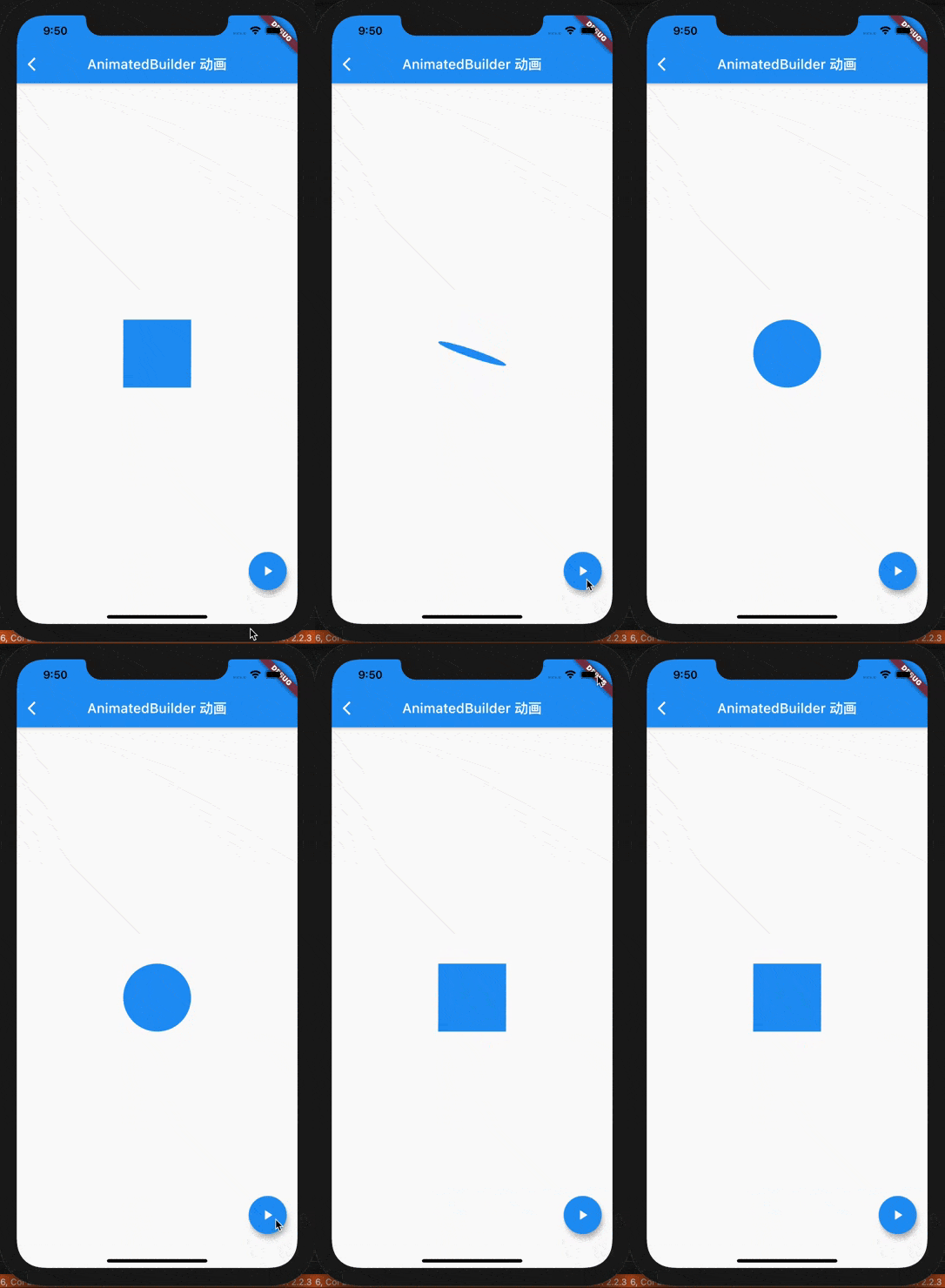
总结
AnimatedBuilderAnimatedBuilderAnimatedBuilder
边栏推荐
猜你喜欢

渲染流程,代码是如何变为页面的(二)

Virtualization path of GPU resource pool
map集合总结

【每日一题】735. 行星碰撞

Preorder and inorder traversal sequences determine a binary tree (restore binary tree)

modular

Hj8 consolidated statement record hj08

EMQX Cloud 更新:新增 Redis 和 JWT 外部认证授权

Based on Huawei WAC dual VRRP hot backup, a three-layer network tunnel forwarding mode solution is attached

Wechat payment apiv3 unified callback interface encapsulation (H5, jsapi, H5, app, applet)

随机推荐
Fibonacci heap - Analysis and Implementation
Hcip day 4 notes
Persistence mechanism, expiration strategy and elimination strategy of redis
快讯:京东科技发布“百亿收入计划”;博通软件业务总裁离职
How does win10 system realize startup program? Using the shell:startup command
Brief discussion -- views on the management of technological transformation
泰山OFFICE技术讲座:奇怪的Times New Roman字体的高度
Jerry's VM will cause the nixie tube to flash when sorting [chapter]
【IDEA】check out master invalid path 问题
05.01 字符串
Lesson 3: stock trading III
VC中获取窗体句柄的各种方法
HCIP第三天笔记
Jerry's dot matrix screen displays the Chinese Bluetooth name [article]
Binomial reactor principle and analysis
Programmer transformation project management? Get a PMP?
What happens when you unplug the power? Gaussdb (for redis) dual life keeps you prepared
HCIP第五天实验
创原会丨携手50+云原生企业,共探跨越数字化鸿沟新模式
程序员转型项目管理?考个PMP?