当前位置:网站首页>CPC client installation tutorial
CPC client installation tutorial
2022-07-23 12:09:00 【Windy Street】
1. Basic computer configuration
My computer system configuration :Windows 10 Family Chinese 64 position (XP、win7、win8 All possible )
Microsoft:Office2010 (32 position ), edition :14.0.4160.1000 【 notes : Up to 2010 edition ,2003 and 2007 It's fine too 】
Provide a for my use Microsoft link , Useful to download and install : link :https://pan.baidu.com/s/1Ei3Kluw9xSCqBvU4Nght7Q, Extraction code :jwyp(30 Days in effect )
My browser :IE browser 11(IE8、IE9、IE10 All possible , Use only CPC The client can not configure the browser )
2. Installation steps
2.1 install OCX
notes : To avoid failure to run after installing the client , It is recommended to install first OCX
(1) Click on China patent electronic application network Download the control ;
(2) Unzip and download a good compressed package ;
(3) Folder has CA Certificates and OCX Control two folders , Open the OCX2016-10-26 Folder , choice setup.exe file , Right click to run as administrator ;
(4) Show that a total of... Needs to be installed this time 4 A related software , Respectively :msxml( Mathematical formula editor )、ActiveX、File Checker and OCX plug-in unit , Click on “ install ”, The installation process of four software , You need to manually click once “Install” or “ install ”;
(a) install msxml( Mathematical formula editor );
(b) install ActiveX, It is worth noting that , When installed ActiveX At the end of the day , The installer will automatically install a verification component , Click Close after installation 
 install File Checker
(d) install OCX plug-in unit 
(5) The prompt is shown in the interface below , installation is complete .
2.2 Certificate control installation
(1) The folder after downloading and extracting the control has CA Certificates and OCX Control two folders , open CA Folder ;
(2) according to “readme.txt” Document tips , Choose to install the corresponding certificate control according to the computer version ;
(3) Select the certificate control , Right click , Choose to run as Administrator ;
(4) Start installation , Click next ; Select the installation directory , Generally, it is the default path , After selecting the installation directory , Click next ; Click on the install ; Click finish , Certificate control installation completed .
2.3 CPC Client installation
(1) Click on China patent electronic application network Install the package CPC Erection sequence (20110218) and CPC Client offline upgrade package (2022-07-04) download ; notes :CPC The offline upgrade package of the client should be of the latest date 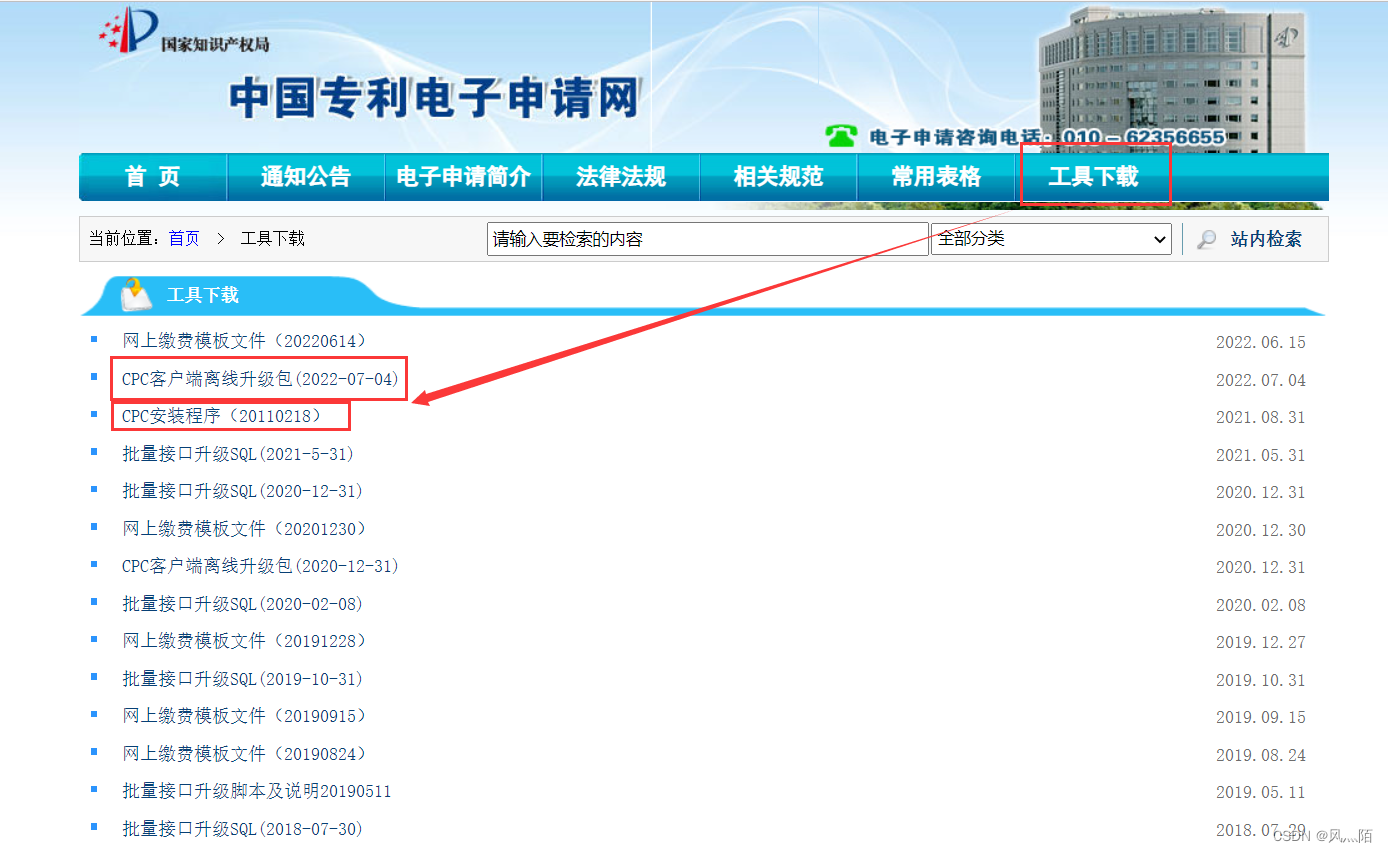
(2) Install the client first , After decompressing , Right click , Choose to run as Administrator , It takes up little space , It is recommended to directly default ;
2.4 CPC Client offline upgrade
(1) choice fmlsetup-ax-greatWallCS.exe file , Right click , Choose to run as Administrator , Follow the wizard to complete the installation of mathematical plug-ins ;
(2) choice OffLineUpdate.exe file , Right click , Choose to run as Administrator , Pop up the prompt box , Tips “ The electronic application client starts to update , Please later …!”
(3) When the prompt changes to “ The electronic application client was successfully updated !” when , The update is successful .
(4) When the prompt is failed : Please check out OffLineUpdate.err file , This document will be OffLineUpdate.exe In the same directory . Open it in Notepad . Please operate according to the prompt .
边栏推荐
- 常用数学知识汇总
- “东数西算”数据中心下算力、AI智能芯片如何发展?
- Space shared by two stacks
- The use of padding.nn.bceloss
- Notes | Baidu flying plasma AI talent Creation Camp: detailed explanation of deep learning model training and key parameter tuning
- Hard disk partition of obsessive-compulsive disorder
- NT68661-屏参升级-RK3128-开机自己升级屏参
- All kinds of ice! Use paddegan of the propeller to realize makeup migration
- Static linked list
- numpy总结
猜你喜欢

ninja启动过程

Ffmpeg audio coding

2. MySQL data management - DML (add, modify, delete data)
笔记 | 百度飞浆AI达人创造营:让人拍案叫绝的创意都是如何诞生的?

Notes | Baidu flying plasma AI talent Creation Camp: data acquisition and processing (mainly CV tasks)
Pytorch个人记录(请勿打开)

Gartner调查研究:中国的数字化发展较之世界水平如何?高性能计算能否占据主导地位?

以不太严谨但是有逻辑的数学理论---剖析VIO之预积分

UE4解决WebBrowser无法播放H.264的问题

飞桨高层API实现人脸关键点检测
随机推荐
生命科学领域下的医药研发通过什么技术?冷冻电镜?分子模拟?IND?
1. Initial experience of MySQL
笔记|(b站)刘二大人:pytorch深度学习实践(代码详细笔记,适合零基础)
MySQL invalid conn troubleshooting
串
K核苷酸频率(KNF,k-nucleotide frequencies)或K-mer频率
对.h5文件的迭代显示,h5py数据操作
Gaode positioning - the problem that the permission pop-up box does not appear
“东数西算”数据中心下算力、AI智能芯片如何发展?
实用卷积相关trick
Development and deployment of steel defect detection using paddlex yolov3 of propeller
Chaoslibrary · UE4 pit opening notes
Necessary mathematical knowledge for machine learning / deep learning
Software test 1
论文解读:《提高N7-甲基鸟苷(m7G)位点预测性能的迭代特征表示方法》
Lecturer solicitation order | Apache dolphin scheduler meetup sharing guests, looking forward to your topic and voice!
MySQL uninstall
MySQL index
Internet communication
Service服务