当前位置:网站首页>【TcaplusDB知识库】Tmonitor单机安装指引介绍(二)
【TcaplusDB知识库】Tmonitor单机安装指引介绍(二)
2022-06-27 10:13:00 【InfoQ】
【TcaplusDB知识库】Tmonitor单机安装指引介绍(二)
- 上图中需要提供mysql 的root 密码, 并且事先建好后台数据库. 步骤与前台数据库一样
- mysql –uroot –pxxxx
- create database db_tmonitor_for_qcloud_singapore_1;
- grant ALL on db_tmonitor_for_qcloud_singapore_1.* to 'tmonitor'@'%' identified by 'xxxx' ;
- grant ALL on db_tmonitor_for_qcloud_singapore_1.* to 'tmonitor'@'localhost' identified by 'xxxx' ;
- grant ALL on db_tmonitor_for_qcloud_singapore_1.* to 'tmonitor'@'127.0.0.1' identified by 'xxxx' ;
- grant ALL on db_tmonitor_for_qcloud_singapore_1.* to 'tmonitor'@'100.78.65.157' identified by 'xxxx'; -- ip
- grant ALL on db_tmonitor_for_qcloud_singapore_1.* to 'tmonitor'@'100_78_65_157' identified by 'xxxx'; -- echo $HOSTNAME
- flush privileges;

- 上图选择需要安装的组件, tcm 和 Business_id 默认与之前填的一样
- 检查22 端口是否能ssh登陆, 否则修改exp端口为36000
- 检查 /etc/ssh/sshd_config 和 sshd_special_user, 确保tmonitor 用户有ssh 登陆权限
- ./tmonitor_install.pl install 开始安装, 安装过程可能会报错, 等待”install end”. 这个脚本会创建tmonitor用户, 并创建/data/tmonitor 目录, 以后所有后台进程都在这个目录下
- 如果执行脚本报错(Can't locate Time/HiRes.pm) 需要安装:
- yum install -y perl-DBD-MySQL perl-Time-HiRes perl-XML-Simple.noarch
- perl-XML-LibXML.x86_64 perl-libxml-perl.noarch
- mysql -utmonitor -pxxxx -Ddb_tmonitor_for_qcloud_singapore_1 登陆看下表是否创建成功
- 由于本机上tcaplus 也安装的tcm 组件, 与tmonitor 的tcm 端口冲突, 所以需要修改/data/tmonitor/tmonitor_install 目录下各个xml(tcmcenter.xml tcmconsole.xml tagent.xml tconnd.xml tcenterd.xml)默认端口并手动拉起进程, 端口使用如下
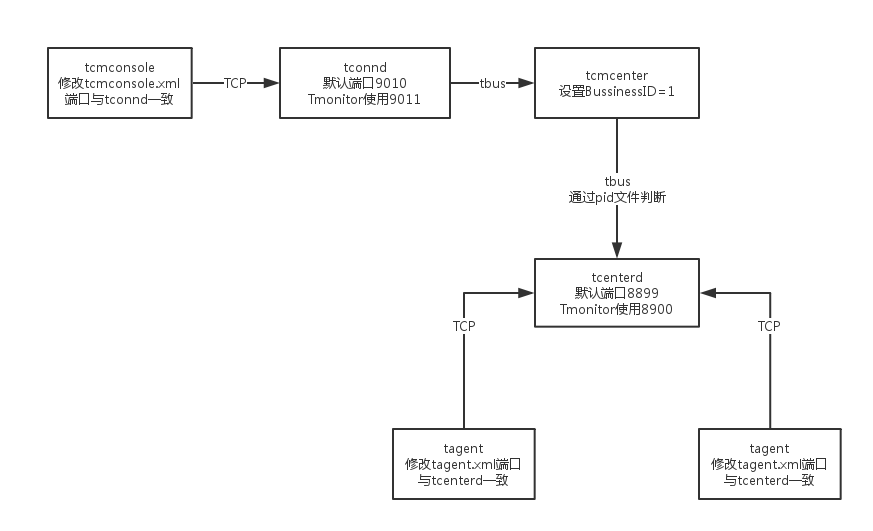
- chmod 777 /tmp/tcmconsole.pid 这个pid 文件tcaplus 和tmonitor 都会用, 所以要修改权限
- 然后按照下图箭头的方向依次启动各个进程, 并登陆tcmconsole 查看进程是否正确, 然后依次拉起dc_tconnd, dcsvr, sasvr 进程
- start 1.0.1.1 可以直接拉起dc_tconnd
- start 1.0.2.1 拉起dcsvr 进程的时候会报错, 查看dcsvr 的日志, 发现需要连接很多mysql数据库. 这是老版的tmonitor遗留下的问题, 需要手动修改
- ~/tmonitor_install/dcsvr_1/cfg]$ vim dcsvr.xml 按照这个文件里面列出的数据库名称创建空库
- 首先root 登陆mysql, 给tomitor 用户创建数据库的权限: grant ALL on.to 'tmonitor'@'100.78.65.157' identified by 'xxxx'; flush privileges
- 然后tmonitor 用户登陆 mysql -utmonitor -pxxxx -h100.78.65.157, 创建以下数据库
- create database tmonitor
- create database db_route
- create database db_273_customscript
- create database db_1_autoupdate
- create database db_2_procstatus_data
- create database 0_tbus_data
- create database 0_thostinfo_data
- create database version
- 然后用sed 修改xml
- sed -i '/DBMSHost/c 100.78.65.157' dcsvr.xml
- sed -i '/DBMSPassword/c xxx' dcsvr.xml
- sed -i '/DBMSUser/c tmonitor' dcsvr.xml
- 修改完成之后去tcmconsole 启动dcsvr 和sasvr 进程
- 所有进程启动成功后, 第二部分就完成了. 如果需要卸载或重装, 执行/data/tmonitor_install/tmonitor_install.pl uninstall 即可
3. 业务配置
- 进入tmonitor 页面, 点击”接入变更”
- 上报方式选择custom 方式, 为节点主动上报, tcm 方式是sasvr 拉取
- 运维管理 -> 申请审批 -> 接入审批 下面审批, cc_id 默认填1
- 然后点”Monitor V2” 下面的”进入” 按钮, 选择刚才填的业务, 首次进入会保错说数据库信息未填写, 先过去补充完整
- 重启sasvr
- 注意, 上图中Tmonitor系统自动分配了业务ID=1, 这个跟之前我们配的business_id 是一样的. 如果不一样, 需要修改xml 下面的BussinessID 和TbusConf并重启, 同样 /tmp/tconnd_1.0.1.$instance_1.pid 这个_1 也要对应修改
- 修改tcaplus 的xml, 增加本机ip 到白名单里面, 重启tcmcenter, 然后去”业务配置” -> “采集策略配置”, 直接从IDC 集群上复制过来, 注意修改ip 和端口, 提交更新
- 修改tcaplus center 关于sasvr 相关的配置项, 重启 然后检查mng_path 是否有数据. 检查所有进程都有指标上报. (修改tcapcenter_cfg.xml, 注意!!! 下图中enable要改成true, HttpGetSasvrInfoUrl 最后的0 要改成1, 跟上面的id 保持一致)
- 业务配置 -> 告警接收者配置 ->分组管理 -> 编辑, 填写告警接收者. 由于这个版本有bug, 所以点编辑没用. 只能从数据库修改, 注意app_id 要包含已有app 和default
- 配置一条告警策略, 测试告警是否能发出来
- 复制IDC 的告警策略到新建的环境上

边栏推荐
- Learning notes - data set generation
- 2021 CSP J2 entry group csp-s2 improvement group round 2 video and question solution
- 迪米特法则
- lvi-sam 总结
- R语言plotly可视化:plotly可视化二维直方图等高线图、在等高线上添加数值标签、自定义标签字体色彩、设置鼠标悬浮显示效果(Styled 2D Histogram Contour)
- 【OpenCV 例程200篇】212. 绘制倾斜的矩形
- [STM32] Hal library stm32cubemx tutorial 12 - IIC (read AT24C02)
- Concepts of concurrency, parallelism, asynchronism, synchronization, multithreading and mutual exclusion
- es 根据索引名称和索引字段更新值
- [从零开始学习FPGA编程-47]:视野篇 - 第三代半导体技术现状与发展趋势
猜你喜欢

Tdengine invitation: be a superhero who uses technology to change the world and become TD hero

Bluetooth health management device based on stm32
![[hcie-rs review mind map] - STP](/img/b5/b89e59fe7f23bf23feeadb991acba7.png)
[hcie-rs review mind map] - STP

谷歌浏览器 chropath插件

The tutor invites you to continue your doctoral study with him. Will you agree immediately?

Audiotrack and audiolinker

TCP/IP 详解(第 2 版) 笔记 / 3 链路层 / 3.4 桥接器与交换机 / 3.4.1 生成树协议(Spanning Tree Protocol (STP))

LVI Sam summary

Es update values based on Index Names and index fields

浅析基于边缘计算的移动AR实现(中)
随机推荐
Review of last week's hot spots (6.20-6.26)
The tutor invites you to continue your doctoral study with him. Will you agree immediately?
Installation manuelle de MySQL par UBUNTU
软交换呼叫中心系统的支撑系统
The R language uses the preprocess function of the caret package for data preprocessing: Center all data columns (subtract the average value from each data column), and set the method parameter to cen
邮件系统(基于SMTP协议和POP3协议-C语言实现)
运维一线工作常用shell脚本再整理
Test how students participate in codereview
12个网络工程师必备工具
别再用 System.currentTimeMillis() 统计耗时了,太 Low,StopWatch 好用到爆!
详解各种光学仪器成像原理
Win10 shortcut key sorting
[so official interview] Why do developers using rust love it so much
Analysis of mobile ar implementation based on edge computing (Part 2)
[STM32] Hal library stm32cubemx tutorial 12 - IIC (read AT24C02)
C any() and aii() methods
C# Any()和AII()方法
Google browser chropath plug-in
Learning notes - data set generation
3D移动 translate3d