当前位置:网站首页>前端工程师需要懂的前端面试题(c s s方面)总结(二)
前端工程师需要懂的前端面试题(c s s方面)总结(二)
2020-11-06 20:48:00 【叫我詹躲躲】
实现元素水平垂直居中的几种方法:
<div id="wrap">
  <div class="box"></div>
</div>
1. 定位方法实现水平垂直居中
<style> *{

	margin: 0;
  padding: 0;
}
#wrap {

	width: 500px;
  height: 500px;
  background: grey;
  position: relative;
}
#wrap .box {

	width: 200px;
  height: 200px;
  background: pink;
  left: 0;
  right: 0;
  top: 0;
  bottom: 0;
	margin: auto;
	position: absolute;
}
</style>
定位和transform方法实现元素水平垂直居中
<style> *{

	margin: 0;
  padding: 0;
}
#wrap {

	width: 500px;
  height: 500px;
  background: grey;
  position: relative;
}
#wrap .box {

	width: 200px;
  height: 200px;
  background: pink;
	position: absolute;
	left: 50%;
	top: 50%;
	transform: translate(-50%, -50%);
}
</style>
3. 最新版本的flex实现元素的水平垂直居中
<style> *{

	margin: 0;
  padding: 0;
}
#wrap {

	width: 500px;
  height: 500px;
  background: grey;
  display: flex;
	justify-content: center;
	align-items: center;
}
#wrap .box {

	width: 200px;
  height: 200px;
  background: pink;
}
</style>
4. 使用老版本flex实现元素水平垂直居中
<style> *{

	margin: 0;
  padding: 0;
}
#wrap {

	width: 500px;
  height: 500px;
  background: grey;
  display: -webkit-box;
	-webkit-box-pack: center;
	-webkit-box-align: center;
}
#wrap .box {

	width: 200px;
  height: 200px;
  background: pink;
}
</style>
用纯css创建一个三角形
主要是把高度和宽度设置成为0,用边框来实现三角形效果
html代码:
<div id="box">
	</div>
css代码:
<style> *{

	margin: 0;
  padding: 0;
}
#box {

	width: 0px;
	height: 0px;
	border: 100px solid ;
	border-top-color: red;
	border-right-color: blue;
	border-left-color: yellowgreen;
	border-bottom-color: deeppink;

}
</style>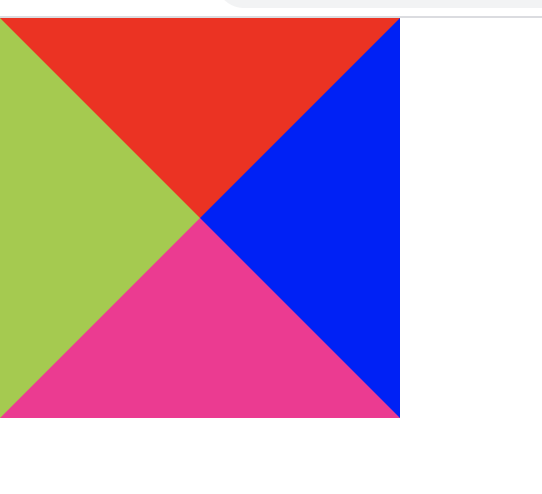
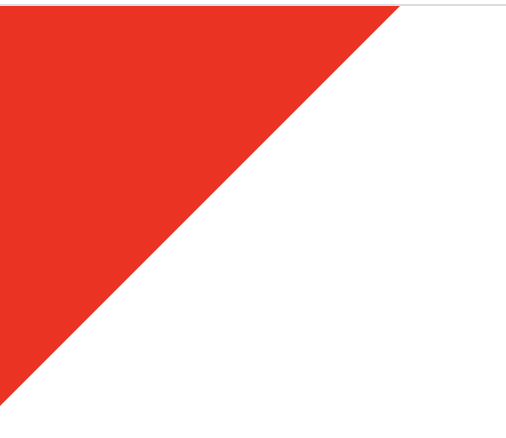
由上图效果可以根据自己需要三角形类型改成相应边框的颜色,不需要的边框设置成transparent
如例子:左边和上边的边框设置成红色
#box {

	width: 0px;
	height: 0px;
	border: 100px solid ;
	border-top-color: red;
	border-right-color: transparent;
	border-left-color: red;
	border-bottom-color:transparent ;

}
如何实现移动端rem适配
html根元素的字体大小设置屏幕区域的宽
<div id="box">
</div><style> *{
margin: 0;
padding: 0;
}
#box {
width: 1rem;
height: 1rem;
background: red;
}
</style><script type="text/javascript"> window.onload = function () {
// 获取屏幕区域宽度
var width=document.documentElement.clientWidth
// 获取html
var htmlNode = document.querySelector('html')
// 设置字体大小
htmlNode.style.fontSize= width + 'px'
}
</script>版权声明
本文为[叫我詹躲躲]所创,转载请带上原文链接,感谢
https://my.oschina.net/u/3995971/blog/4558927
边栏推荐
- Group count - word length
- Summary of common algorithms of binary tree
- 至联云解析:IPFS/Filecoin挖矿为什么这么难?
- 6.5 request to view name translator (in-depth analysis of SSM and project practice)
- Grouping operation aligned with specified datum
- In order to save money, I learned PHP in one day!
- How to encapsulate distributed locks more elegantly
- After brushing leetcode's linked list topic, I found a secret!
- TRON智能钱包PHP开发包【零TRX归集】
- 教你轻松搞懂vue-codemirror的基本用法:主要实现代码编辑、验证提示、代码格式化
猜你喜欢

In order to save money, I learned PHP in one day!

PHP应用对接Justswap专用开发包【JustSwap.PHP】

Summary of common string algorithms
一篇文章带你了解CSS 分页实例

How to encapsulate distributed locks more elegantly
Thoughts on interview of Ali CCO project team
100元扫货阿里云是怎样的体验?
华为云“四个可靠”的方法论

Tool class under JUC package, its name is locksupport! Did you make it?

Use of vuepress
随机推荐
6.3 handlerexceptionresolver exception handling (in-depth analysis of SSM and project practice)
中国提出的AI方法影响越来越大,天大等从大量文献中挖掘AI发展规律
Process analysis of Python authentication mechanism based on JWT
教你轻松搞懂vue-codemirror的基本用法:主要实现代码编辑、验证提示、代码格式化
一篇文章带你了解CSS对齐方式
Grouping operation aligned with specified datum
熬夜总结了报表自动化、数据可视化和挖掘的要点,和你想的不一样
htmlcss
Let the front-end siege division develop independently from the back-end: Mock.js
速看!互联网、电商离线大数据分析最佳实践!(附网盘链接)
How to become a data scientist? - kdnuggets
Analysis of react high order components
6.4 viewresolver view parser (in-depth analysis of SSM and project practice)
Group count - word length
Real time data synchronization scheme based on Flink SQL CDC
html
助力金融科技创新发展,ATFX走在行业最前列
比特币一度突破14000美元,即将面临美国大选考验
從小公司進入大廠,我都做對了哪些事?
如何将数据变成资产?吸引数据科学家