当前位置:网站首页>The use of pytorch: temperature prediction using neural networks
The use of pytorch: temperature prediction using neural networks
2022-08-05 00:59:00 【The romance of cherry blossoms】
1.首先,Let's take a look at what's going on with the data
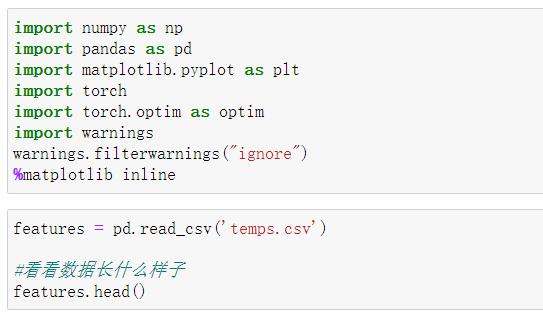

数据表中
- year,moth,day,week分别表示的具体的时间
- temp_2:前天的最高温度值
- temp_1:昨天的最高温度值
- average:在历史中,每年这一天的平均最高温度值
- actual:这就是我们的标签值了,当天的真实最高温度
- friend:这一列可能是凑热闹的,你的朋友猜测的可能值,whatever it is
Year, month and day are all characteristics of time,We convert it to time type data,To facilitate our drawing display
# 处理时间数据
import datetime

# 分别得到年,月,日
years = features['year']
months = features['month']
days = features['day']

# datetime格式
dates = [str(int(year)) + '-' + str(int(month)) + '-' + str(int(day)) for year, month, day in zip(years, months, days)]
dates = [datetime.datetime.strptime(date, '%Y-%m-%d') for date in dates]
We then use the graph to visually display the data:
# 准备画图
# 指定默认风格
plt.style.use('fivethirtyeight')

# 设置布局
fig, ((ax1, ax2), (ax3, ax4)) = plt.subplots(nrows=2, ncols=2, figsize = (10,10))
fig.autofmt_xdate(rotation = 45)

# 标签值
ax1.plot(dates, features['actual'])
ax1.set_xlabel(''); ax1.set_ylabel('Temperature'); ax1.set_title('Max Temp')

# 昨天
ax2.plot(dates, features['temp_1'])
ax2.set_xlabel(''); ax2.set_ylabel('Temperature'); ax2.set_title('Previous Max Temp')

# 前天
ax3.plot(dates, features['temp_2'])
ax3.set_xlabel('Date'); ax3.set_ylabel('Temperature'); ax3.set_title('Two Days Prior Max Temp')

# 我的逗逼朋友
ax4.plot(dates, features['friend'])
ax4.set_xlabel('Date'); ax4.set_ylabel('Temperature'); ax4.set_title('Friend Estimate')

plt.tight_layout(pad=2) 
Convert text data to one-hot encoding:

Remove the label column from the feature:
# 标签
labels = np.array(features['actual'])

# 在特征中去掉标签
features= features.drop('actual', axis = 1)

# 名字单独保存一下,以备后患
feature_list = list(features.columns)

# 转换成合适的格式
features = np.array(features)
对数据进行标准化处理:

2.构建网络模型
包括:权重参数初始化、计算隐层、加入激活函数、预测结果、计算损失、返向传播计算、更新参数.另外,Remember to clear the gradient every iteration,否则梯度会累加
x = torch.tensor(input_features, dtype = float)

y = torch.tensor(labels, dtype = float)

# 权重参数初始化
weights = torch.randn((14, 128), dtype = float, requires_grad = True)
biases = torch.randn(128, dtype = float, requires_grad = True)
weights2 = torch.randn((128, 1), dtype = float, requires_grad = True)
biases2 = torch.randn(1, dtype = float, requires_grad = True)

learning_rate = 0.001
losses = []

for i in range(1000):
    # 计算隐层
    hidden = x.mm(weights) + biases
    # 加入激活函数
    hidden = torch.relu(hidden)
    # 预测结果
    predictions = hidden.mm(weights2) + biases2
    # 通计算损失
    loss = torch.mean((predictions - y) ** 2)
    losses.append(loss.data.numpy())

    # 打印损失值
    if i % 100 == 0:
        print('loss:', loss)
    #返向传播计算
    loss.backward()

    #更新参数
    weights.data.add_(- learning_rate * weights.grad.data)
    biases.data.add_(- learning_rate * biases.grad.data)
    weights2.data.add_(- learning_rate * weights2.grad.data)
    biases2.data.add_(- learning_rate * biases2.grad.data)

    # 每次迭代都得记得清空
    weights.grad.data.zero_()
    biases.grad.data.zero_()
    weights2.grad.data.zero_()
    biases2.grad.data.zero_()

3.Simpler network model
直接使用nn.Model
input_size = input_features.shape[1]
hidden_size = 128
output_size = 1
batch_size = 16
my_nn = torch.nn.Sequential(
    torch.nn.Linear(input_size, hidden_size),
    torch.nn.Sigmoid(),
    torch.nn.Linear(hidden_size, output_size),
)
cost = torch.nn.MSELoss(reduction='mean')
optimizer = torch.optim.Adam(my_nn.parameters(), lr = 0.001)
训练网络:
# 训练网络
losses = []
for i in range(1000):
    batch_loss = []
    # MINI-Batch方法来进行训练
    for start in range(0, len(input_features), batch_size):
        end = start + batch_size if start + batch_size < len(input_features) else len(input_features)
        xx = torch.tensor(input_features[start:end], dtype = torch.float, requires_grad = True)
        yy = torch.tensor(labels[start:end], dtype = torch.float, requires_grad = True)
        prediction = my_nn(xx)
        loss = cost(prediction, yy)
        optimizer.zero_grad()
        loss.backward(retain_graph=True)
        optimizer.step()
        batch_loss.append(loss.data.numpy())

    # 打印损失
    if i % 100==0:
        losses.append(np.mean(batch_loss))
        print(i, np.mean(batch_loss))
4.预训练结果
x = torch.tensor(input_features, dtype = torch.float)
predict = my_nn(x).data.numpy()
转换日期格式
dates = [str(int(year)) + '-' + str(int(month)) + '-' + str(int(day)) for year, month, day in zip(years, months, days)]
dates = [datetime.datetime.strptime(date, '%Y-%m-%d') for date in dates]
# 创建一个表格来存日期和其对应的标签数值
true_data = pd.DataFrame(data = {'date': dates, 'actual': labels})
# 同理,再创建一个来存日期和其对应的模型预测值
months = features[:, feature_list.index('month')]
days = features[:, feature_list.index('day')]
years = features[:, feature_list.index('year')]
test_dates = [str(int(year)) + '-' + str(int(month)) + '-' + str(int(day)) for year, month, day in zip(years, months, days)]
test_dates = [datetime.datetime.strptime(date, '%Y-%m-%d') for date in test_dates]
predictions_data = pd.DataFrame(data = {'date': test_dates, 'prediction': predict.reshape(-1)}) # 真实值
plt.plot(true_data['date'], true_data['actual'], 'b-', label = 'actual')
# 预测值
plt.plot(predictions_data['date'], predictions_data['prediction'], 'ro', label = 'prediction')
plt.xticks(rotation = '60');
plt.legend()
# 图名
plt.xlabel('Date'); plt.ylabel('Maximum Temperature (F)'); plt.title('Actual and Predicted Values');

边栏推荐
- GCC: Shield dependencies between dynamic libraries
- MBps与Mbps区别
- PCIe Core Configuration
- Software Testing Interview Questions: What Are the Types of Software Testing?
- 从一次数据库误操作开始了解MySQL日志【bin log、redo log、undo log】
- Lattice PCIe Learning 1
- 配置类总结
- [FreeRTOS] FreeRTOS and stm32 built-in stack occupancy
- 如何用 Solidity 创建一个“Hello World”智能合约
- linux(centOs7)部署mysql(8.0.20)数据库
猜你喜欢


![[FreeRTOS] FreeRTOS and stm32 built-in stack occupancy](/img/33/3177b4c3de34d4920d741fed7526ee.png)


随机推荐
Difference between MBps and Mbps
Software testing interview questions: What are the three modules of LoadRunner?
ora-00604 ora-02429
蓝牙Mesh系统开发四 ble mesh网关节点管理
Inter-process communication and inter-thread communication
torch.autograd.grad求二阶导数
Software testing interview questions: the difference and connection between black box testing, white box testing, and unit testing, integration testing, system testing, and acceptance testing?
深度学习:使用nanodet训练自己制作的数据集并测试模型,通俗易懂,适合小白
C# const readonly static 关键字区别
2022牛客多校训练第二场 L题 Link with Level Editor I
How DHCP works
Binary tree [full solution] (C language)
快速批量修改VOC格式数据集标签的文件名,即快速批量修改.xml文件名
EL定时刷新页面中的皕杰报表实例
【FreeRTOS】FreeRTOS与stm32内置堆栈的占用情况
GCC:编译时库路径和运行时库路径
Memory Forensics Series 1
Software Testing Interview Questions: What Are the Types of Software Testing?
【机器学习】21天挑战赛学习笔记(二)
蓝牙Mesh系统开发五 ble mesh设备增加与移除